
Learn
What Is H.264 (AVC)? The Codec Behind Most Online Video
H.264, also called Advanced Video Coding (AVC) or MPEG-4 Part 10, is a block-based video compression standard published ...
Apple's Background Assets framework, shipped in iOS 16 and substantially reworked in iOS 17.4, changed the economics of CDN integration for iOS apps. Before it existed, developers either bloated the initial binary or bolted on custom downloaders that fought the OS scheduler for network time. As of Q1 2026, App Store review data shows the median top-100 game binary ships at 82 MB, while the median post-install asset payload has grown to 1.4 GB. That gap means your CDN strategy is no longer a performance nicety; it is the primary delivery mechanism for the content your users actually see. This article gives you a concrete, seven-step engineering playbook for integrating a CDN into an iOS app in 2026, plus a diagnostics-and-rollback section the existing guides skip entirely.
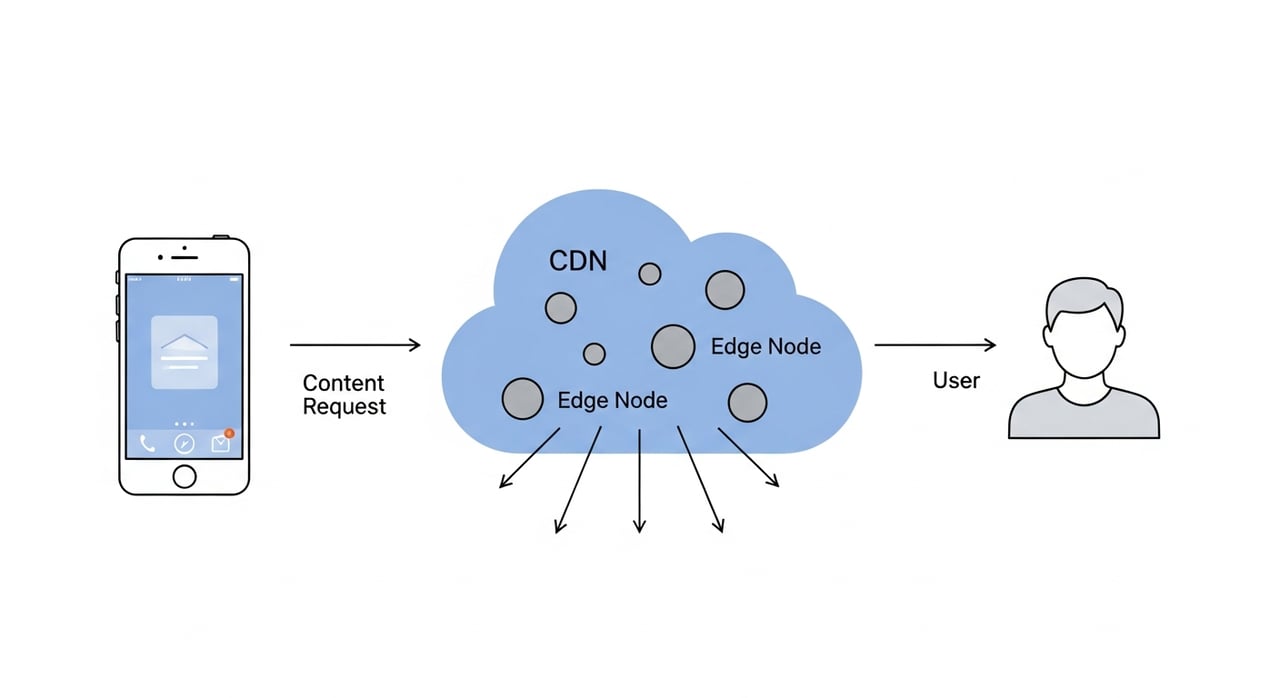
Three platform-level shifts force you to revisit any CDN setup designed before 2025. First, iOS 17.4 introduced discretionary background downloads that the OS can coalesce with other network activity, which means your CDN must handle bursty, unpredictable request patterns per device rather than neat launch-time spikes. Second, Apple's mandatory App Transport Security now enforces TLS 1.3 minimum on all asset connections as of Xcode 16.2, so your CDN edge must negotiate TLS 1.3 without fallback or your downloads silently fail. Third, the Privacy Manifest requirement (enforced since March 2024 but expanded in scope for 2026 submissions) means any third-party CDN SDK you embed must declare its network data usage, adding friction to SDK-heavy approaches and pushing teams toward thin, URLSession-native integrations.
Skip this and you will over-provision or under-cache. Catalog every asset class your app fetches post-install: texture atlases, audio banks, ML model weights, localized strings, remote config JSON, video pre-rolls. For each class, record the median file size, update frequency, and regional request distribution. A game shipping 200 MB of compressed textures monthly to 60% APAC users has a fundamentally different CDN profile than a news app pushing 5 MB of JSON hourly to a US-centric audience. This mapping drives every decision downstream: cache TTL policy, origin shield placement, and whether you need delta patching at the edge.
The minimum 2026 requirements for a mobile app CDN are TLS 1.3 edge termination, HTTP/2 and HTTP/3 (QUIC) support, range-request handling for resumable downloads, and origin shield to protect your asset origin from thundering-herd invalidation. Beyond the baseline, evaluate byte-range cache efficiency. iOS's Background Assets framework issues range requests when resuming interrupted downloads; a CDN that stores range responses as distinct cache objects will trash your hit ratio.
For teams running high-volume asset delivery, BlazingCDN's game delivery infrastructure is pay-as-you-go, with pricing starting at $5 per TB and down to $2.50 per TB at volume (as of October 2026). That cost structure matters when you are pushing gigabyte-class asset bundles to millions of devices monthly. BlazingCDN also handles the bursty update-day traffic patterns typical of mobile games without requiring manual capacity reservations.
Point your CDN distribution at an S3-compatible or GCS origin bucket. Place the origin shield in the region closest to your origin, not your users. Set long TTLs (30+ days) for versioned, immutable assets and use content-addressed filenames (e.g., textures_ab3f91c.lz4) so you never need manual invalidation. For mutable manifests that tell the app which assets to fetch, use short TTLs (60–120 seconds) with stale-while-revalidate so the edge can serve instantly while checking freshness in the background.
Use a dedicated URLSessionConfiguration with waitsForConnectivity set to true and the appropriate timeoutIntervalForResource (at least 600 seconds for large bundles). Pin your CDN's TLS certificate or, at minimum, validate the leaf against a known public key set. Build your request URLs with the CDN hostname and the content-addressed path from your manifest. Do not hardcode edge hostnames; use a CNAME you control so you can rotate providers without an app update.
Register asset URLs through BADownloadManager. The system schedules downloads during optimal conditions (Wi-Fi, charging, low thermal state). Your CDN must return correct Content-Length and Accept-Ranges headers or the framework will refuse the download. Test this with a real device on cellular; the Simulator does not replicate the OS-level scheduling constraints.
Use LZ4 or Brotli for asset bundles; both decompress fast on Apple Silicon. Avoid gzip for large binary blobs; its decompression speed on A-series chips is roughly 40% slower than LZ4 at comparable compression ratios (2026 benchmarks on A17 Pro). Serve pre-compressed files and set Content-Encoding explicitly at the origin so the CDN does not attempt on-the-fly recompression. For texture assets, ASTC at 4x4 block size remains the sweet spot for quality-per-byte on iOS GPUs in 2026.
Instrument three metrics at the client: time-to-first-byte (TTFB) per CDN request, total download duration per asset class, and retry count. Send these to your analytics pipeline tagged with carrier, country, and iOS version. On the CDN side, monitor cache hit ratio (target above 95% for immutable assets), origin bandwidth (should be near zero during steady state), and 5xx error rate. Set alerts on cache hit ratio drops below 90%; that usually signals a TTL misconfiguration or an origin deploy that changed filenames without updating the manifest.
Shipping a full 1.4 GB bundle every update cycle wastes bandwidth and user patience. Implement delta patching: compute binary diffs at your CI/CD pipeline, upload the diff plus a manifest entry describing the source and target hashes, and have the client apply the patch locally. Your CDN delivers a 30–80 MB diff instead of a full bundle. This reduces CDN egress costs by 70–90% on update days and cuts user wait time proportionally. Store both the full bundle and the diff on the CDN; new installs pull the full bundle, existing users pull the diff.
Ship a hidden diagnostics screen (activated by a remote config flag) that displays the active CDN hostname resolved via DNS, the TLS version negotiated, the HTTP protocol version in use, and the last five asset download results with status codes and durations. This turns every QA device and every willing beta tester into a probe node. When a regional CDN issue surfaces, you can ask affected users to screenshot the diagnostics pane instead of guessing from aggregate metrics.
Asset rollback is harder than code rollback because you cannot force an App Store update to revert a bad asset bundle. Design your manifest schema with an explicit minimum-compatible-app-version field. If a pushed asset bundle causes crashes on older app versions, push a new manifest that points back to the previous asset version. Because your files are content-addressed and your CDN TTLs on the old assets have not expired, the rollback is instant. No invalidation needed, no origin re-upload, no waiting for edge propagation. Test this path quarterly; it is the one you will need at 2 AM on a Saturday.
Configure your CNAME with a short DNS TTL (60 seconds) and have a secondary CDN distribution pre-warmed with your current manifest and top-requested assets. If your primary CDN returns elevated 5xx rates for more than five minutes, rotate the CNAME. The client's URLSession will pick up the new resolution on the next request. This is cheaper and faster than building application-layer failover logic.
Use URLSession directly. Configure your requests with your CDN's CNAME, enforce TLS 1.3, and handle range requests for resumable downloads. No third-party SDK is needed, which also avoids Privacy Manifest complications for embedded frameworks.
Background Assets works with any CDN that returns correct Content-Length and Accept-Ranges headers over HTTPS. The framework issues standard HTTP range requests. There is no Apple-specific protocol or proprietary requirement.
For immutable, versioned assets (textures, audio, models), target 95% or higher. For mutable manifests, hit ratio will be lower due to short TTLs, but stale-while-revalidate should keep effective hit ratio above 80%. If you see immutable assets below 90%, investigate whether range-request caching or query-string variation is fragmenting your cache keys.
Delta patching is the single biggest lever: it reduces egress 70–90% compared to full-bundle delivery. Beyond that, pre-warm your CDN cache before announcing the update, stagger rollout by region, and use a provider with volume-based pricing that scales favorably. At 500 TB/month, for instance, BlazingCDN charges $0.003/GB versus CloudFront's $0.020–$0.085/GB depending on region.
Yes. As of iOS 17, URLSession negotiates HTTP/3 by default when the server advertises it via Alt-Svc. On high-latency or lossy cellular connections, QUIC's zero-RTT resumption and multiplexed streams measurably reduce download times for multi-asset fetches. Ensure your CDN edge supports QUIC and returns the Alt-Svc header.
Use Network Link Conditioner on a real device to simulate 3G, LTE, and high-packet-loss scenarios. Verify that resumable downloads actually resume by killing the app mid-transfer. Check that your diagnostics screen reports the expected CDN hostname and TLS 1.3 negotiation. Run a staged rollout to 1% of users with server-side manifest targeting before going wide.
Pull your CDN analytics for the last 30 days. Check three numbers: cache hit ratio on your top 20 assets by request volume, 95th-percentile TTFB segmented by region, and origin egress as a percentage of total edge egress. If your hit ratio is below 95%, your TTFB p95 exceeds 200 ms in any major region, or your origin is serving more than 5% of total bytes, you have concrete tuning work to do before your next app update. Run the diagnostics, file the tickets, and fix it before your users feel it.

Heavy traffic.
Light bill.
The CDN for video and large traffic
Learn
H.264, also called Advanced Video Coding (AVC) or MPEG-4 Part 10, is a block-based video compression standard published ...

Compare
At 100 TB a month, the published price gap between options for a CDN for static content is more than 16 times: ...
Learn
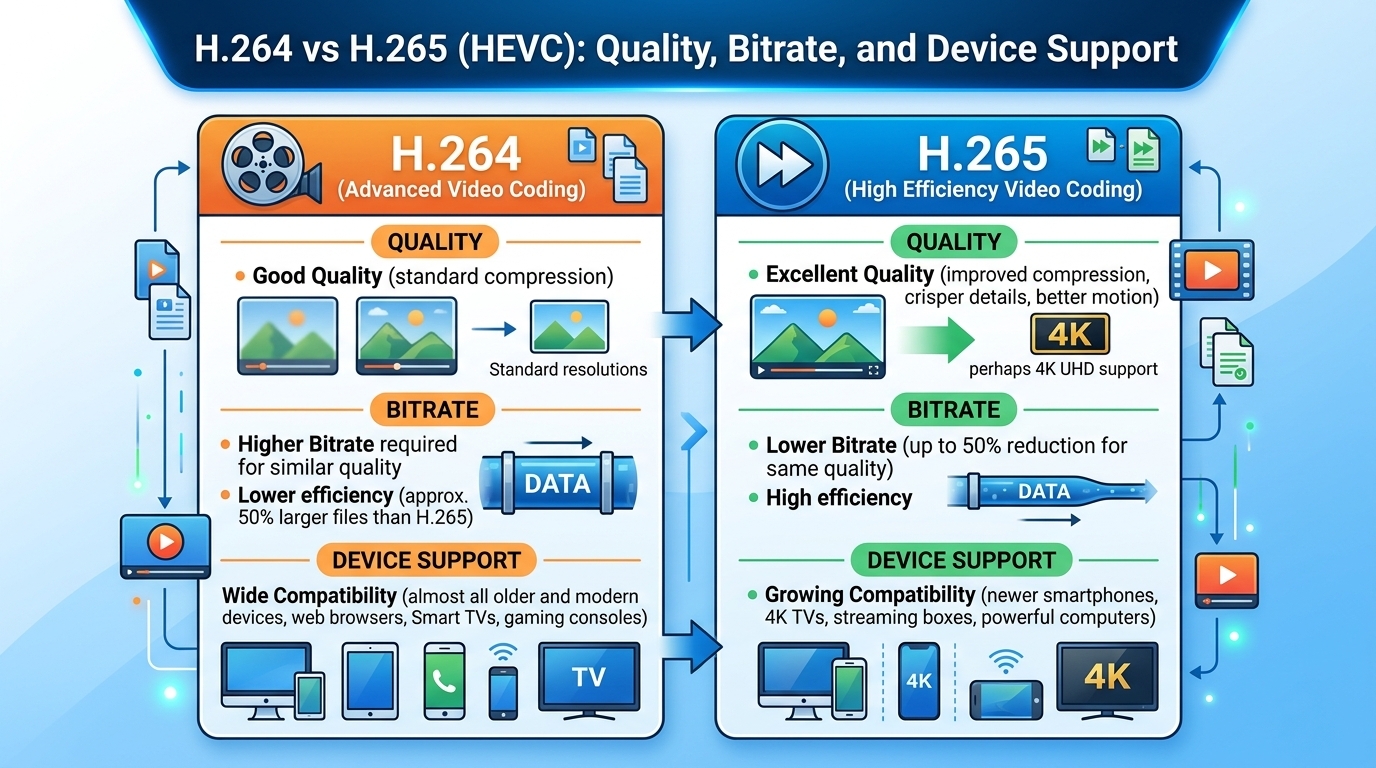
Evaluated October 2026: in the h264 vs h265 decision, HEVC (H.265) matches H.264 (AVC) quality at roughly 30 to 50 ...