
Learn
What Is H.264 (AVC)? The Codec Behind Most Online Video
H.264, also called Advanced Video Coding (AVC) or MPEG-4 Part 10, is a block-based video compression standard published ...
A surprising number of failed WordPress CDN rollouts have nothing to do with edge capacity. They fail because the first production deploy rewrites static asset URLs while leaving cache headers, cookie scope, purge flow, and mixed origin behavior untouched. The symptom set is familiar at scale: p95 document latency improves a little, but p99 image latency stays noisy, origin egress barely drops, admin sessions bleed onto cacheable paths, and one plugin update creates a long-tail cache poisoning incident you only notice after social traffic lands.
That is the real wordpress cdn integration problem in enterprise WordPress estates. The obvious move, install a wordpress cdn plugin and point it at a new hostname, works for brochure sites. It breaks down on multisite, WooCommerce, video-heavy publishing stacks, and any setup where cache key hygiene matters more than the happy-path benchmark.
The hard part is not getting assets onto a CDN hostname. The hard part is preserving deterministic behavior across four distinct planes: browser cache, edge cache, page cache, and application state. WordPress makes this deceptively easy to misconfigure because plugins can rewrite URLs without enforcing header policy, and many themes still emit mixed absolute URLs from uploads, CSS, JavaScript bundles, and responsive image variants.
At enterprise traffic levels, the penalties are measurable. As of 2026, public performance data across browser telemetry and backbone observations still shows that tail latency, not median latency, dominates user-visible regressions. A 50 to 100 ms improvement in p50 static delivery is often erased by p95 and p99 stalls caused by cache misses, TLS churn on fragmented hostnames, or origin fetch amplification during publish spikes. RFC 9111 behavior also matters here: cacheability is ultimately header-driven, so URL rewriting without coherent Cache-Control and validator strategy produces inconsistent edge residency.
There is also a protocol-level trap. HTTP/2 and HTTP/3 reduce connection overhead, but only if the browser can reuse connections sensibly. Splitting assets across unnecessary hostnames can hurt instead of help, especially after domain sharding became a net negative for many modern browsers. The old “cookieless static domain” habit is not automatically an optimization anymore. For enterprise wordpress cdn deployments, one well-scoped custom CNAME with stable TLS and disciplined header policy usually beats a grab bag of plugin defaults.
Before touching WordPress, define what “better” means. For most production estates, a successful wordpress cdn setup should move three numbers, not one: static object cache hit ratio above 95 percent for immutable assets, origin egress for those asset classes down by at least 80 percent, and p95 edge TTFB for cache hits staying inside a narrow band during publish bursts. If you only track homepage load time from one geography, you are blind to the failure mode that matters.
Public measurements over the last two years consistently support a few operating assumptions. First, packet loss at even low single-digit percentages hurts application performance disproportionately compared with clean-path RTT increases. Second, large media objects and responsive image variants produce highly skewed cache distributions, so a “global hit ratio” can look healthy while the long tail remains origin-bound. Third, personalized cookies on nominally static paths remain one of the most common causes of accidental bypass in WordPress stacks.
Use these assumptions as design targets rather than universal truths:
The implication is simple. The best wordpress cdn configuration is the one that improves tail behavior and origin stability under invalidation events, not the one that wins a single synthetic test from Virginia.
What to do: Build an explicit path inventory before enabling rewriting. Separate immutable static assets, media library objects, generated image derivatives, personalized responses, admin paths, preview paths, API endpoints, and any signed or tokenized media flows.
Why this approach: WordPress emits very different object classes from one stack. Theme bundles and plugin assets are usually ideal CDN candidates. Uploads are usually good candidates but may need MIME and header cleanup. HTML documents depend on your page cache and personalization model. wp-admin, login, preview, carts, checkout, and authenticated API responses should be treated as non-cacheable control-plane traffic unless you have a very deliberate design.
Signal you got it right: Every high-volume URL pattern in access logs belongs to one of three buckets: cache aggressively, deliver but do not cache, or bypass the CDN entirely. If you cannot classify the top 95 percent of requests by volume, stop here.
| Pattern | Best for | Operational upside | Common failure mode |
|---|---|---|---|
| Static hostname rewrite for assets and uploads | Publishing platforms, media sites, multisite with shared media policies | Fast rollout, clear blast radius, easy rollback | Mixed-content or origin-header inconsistency on uploads |
| Full-site proxy with selective bypass | High-scale anonymous traffic, heavily cached HTML, editorial burstiness | Single hostname, simpler browser connection model, better document acceleration | Cookie leakage into cache key or bypass rules |
| Hybrid: CDN for assets plus origin/page cache for HTML | WooCommerce, membership, mixed authenticated and public workloads | Reduces risk while still cutting egress and long-tail media latency | Teams assume the CDN solved document performance when it did not |
For most enterprise WordPress environments, start with the hybrid pattern. It is the lowest-risk path to a correct wordpress cdn integration because it isolates the first wave of changes to assets and uploads while preserving your current HTML cache semantics.
Signal you got it right: Your chosen pattern matches business constraints. If you have carts, paywalls, regional personalization, or editors previewing content all day, full-site proxy should not be your first move.
What to do: Provision the CDN endpoint, create a dedicated custom CNAME such as static.example.com or media.example.com, and map it only after confirming certificate issuance, DNS propagation, and origin host behavior. If you are searching for how to configure blazingcdn edge address in wordpress, the key is to map a single stable hostname that WordPress can use for rewritten asset URLs without overlapping application cookies or admin paths.
Why that approach: One custom hostname simplifies TLS reuse, observability, and rollback. It also gives you a clean separation between cacheable object classes and application traffic. If your current cookies are scoped to the apex domain, check whether the static hostname will inherit them. If yes, fix cookie domain policy before rollout or you will sabotage cacheability.
Signal you got it right: Requests to the new hostname return the expected object set, present the correct certificate chain, and do not carry application cookies on cacheable asset paths.
What to do: Decide whether URL rewriting should be owned by a wordpress cdn plugin, your caching plugin, or WordPress constants and filters managed in code. On single-site estates with low plugin entropy, a mature plugin can be fine. On enterprise stacks with CI/CD, multisite, multiple teams, or strict change control, prefer configuration in code or in a centrally managed mu-plugin.
Why that approach: Plugin UI state is notoriously hard to diff, audit, and reproduce across environments. Code-managed rewriting reduces drift. It also makes blue-green testing easier because you can expose the CDN hostname only in selected environments or for selected tenants first.
Signal you got it right: A staging-to-production diff clearly shows where asset host rewriting is enabled, and rollback can be done without clicking through multiple plugin settings pages.
What to do: Set header policy per object class. Immutable versioned theme and plugin assets should get long TTLs and immutable semantics. Uploads need a policy based on editorial replacement frequency and whether filenames are content-addressed or collision-prone. HTML document caching belongs to your page-cache strategy, not your static asset rewrite plan.
Why that approach: The fastest CDN is still bound by your origin metadata. If WordPress serves uploads with weak or inconsistent headers, the CDN can only partially compensate. Enterprises often discover too late that image replacement in the media library reuses filenames, which makes long TTLs dangerous unless purge discipline is strong.
Signal you got it right: Cache-hit ratios climb after warm-up without a corresponding rise in stale-asset incidents. If marketing replaces a hero image and sees the old version for hours, your upload TTL policy is too optimistic or your purge path is too weak.
What to do: Define what events trigger purge: post publish, post update, attachment replacement, theme deploy, plugin deploy, CSS bundle hash change, image regeneration, and cache plugin flush. Then limit purge scope. Purge URLs or tags tied to changed objects where possible. Avoid full-zone invalidation except during controlled maintenance.
Why that approach: Full invalidation during high traffic turns your CDN into a miss amplifier. On WordPress, this is especially painful after editorial pushes or homepage rotations because many pages reference the same media objects and widget fragments.
Signal you got it right: After a content publish, only the expected object set misses at the edge, and origin fetch rate remains inside normal burst envelope. If a routine post update causes a zone-wide miss storm, revisit purge granularity.
What to do: If you need to know how to set up blazingcdn with wp super cache, treat page caching and asset offload as separate control loops. Let WP Super Cache own HTML generation and anonymous document caching. Let the CDN own static assets and optionally HTML delivery only after you prove cookie and cache-key safety. Verify that purge events from WP Super Cache do not trigger unnecessary asset invalidation, and that HTML pages generated by the plugin reference the CDN hostname consistently.
Why that approach: WP Super Cache is effective because it reduces PHP execution for anonymous traffic. But it knows nothing about your edge cache semantics unless you wire the two systems together carefully. If both layers purge too broadly, publish traffic will hammer origin instead of smoothing it.
Signal you got it right: Anonymous HTML hit ratio remains stable after content updates, while asset hit ratio stays above your target and origin request concurrency does not spike beyond pre-change limits.
What to do: Prepare a one-step rollback path that disables rewriting or reverts DNS weight without touching the origin stack. Stage this before the first production wave.
Why that approach: The most common rollback trigger is not outage. It is content correctness: stale uploads, malformed responsive image URLs, broken font CORS, or plugin-generated asset paths you did not inventory. Fast rollback reduces the temptation to debug a broken cache policy during business hours.
Signal you got it right: You can restore direct-origin asset delivery within minutes and without invalidating unrelated caches.
Teams searching for how to add a custom cname for blazingcdn in wordpress usually focus on DNS only. That is necessary but not sufficient. The practical sequence is DNS, certificate validation, origin host validation, cookie-scope validation, then URL rewriting. In that order.
The cookie check matters more than many teams assume. If your application sets broad Domain attributes, the browser may attach session cookies to the asset hostname. Even if the edge ignores them for cache key construction, some CDNs and origin patterns will treat those requests differently, and intermediate caches can become less efficient. Keep the asset hostname outside the cookie scope whenever possible.
For large WordPress estates, this is where BlazingCDN is worth evaluating as a cost-optimized enterprise-grade option alongside hyperscalers. It is a pay-as-you-go CDN with Anycast routing and built-in failover, which matters when media libraries and responsive image variants turn “cheap bandwidth” assumptions into a six-figure annual line item. Its pricing starts at $5 per TB and scales down to $2.50 per TB at volume (as of October 2026), with flexible configuration and no long-term contract. If you are comparing enterprise options, review BlazingCDN's enterprise edge configuration.
Do not validate this change with a homepage screenshot and a Lighthouse run. Validate it like a distributed systems change.
First, measure cache-hit health. Pick the top 20 static URLs by volume, then confirm their edge status distribution over a one-hour window after warm-up. Normal means at least 95 percent hits for versioned assets and a tight p95 TTFB band. Problem means repeated misses without corresponding content changes, which usually points to header drift, query-string fragmentation, or accidental purge overreach.
Second, inspect cookie leakage. Sample requests to the asset hostname from real-user telemetry or edge logs. Normal means near-zero authenticated or session cookie presence on static paths. Problem means any material share of cacheable requests carrying user-state cookies. Above 1 percent on a pure static hostname is worth investigating; above 5 percent is usually a design flaw.
Third, compare origin egress before and after rollout. Normal means a sharp drop in asset-class egress, usually visible within hours on stable traffic. Problem means cache-hit rates look good but origin egress remains high, which often indicates large uploads bypassing cache, mismatched hostnames, or responsive image variants still pointing at origin.
Fourth, watch publish and purge events. Trigger a controlled content update that touches the homepage, one article, and several images. Normal means a bounded miss burst followed by rapid recovery. Problem means origin concurrency and backend response time stay elevated well beyond cache rewarming, suggesting invalidation is too broad or WP Super Cache and the CDN are flushing redundantly.
Fifth, test tail behavior under moderate concurrency. Use your usual load tools from at least two geographies, but focus on p95 and p99 for cache-hit assets and anonymous HTML, not just aggregate throughput. Normal means cache-hit tails stay predictable under increased request rate. Problem means tails stretch despite healthy hit ratio, which usually shifts the investigation toward DNS resolution, TLS setup, or browser connection behavior on the chosen hostname layout.
A correct wordpress cdn setup improves efficiency, but it also adds another stateful control plane. That has costs.
Media replacement with stable filenames: Editorial teams often replace assets in place. If uploads are cached aggressively and filenames do not change, stale content is inevitable unless purge is prompt and reliable. The clean fix is content-addressed or versioned filenames. The operational fix is narrower TTLs plus deterministic purge. The cheap fix is “wait and see,” which is how support tickets get created.
WooCommerce and membership cookies: These stacks are where naïve wordpress cdn integration goes sideways. Account state, cart fragments, nonce-bearing endpoints, and personalized HTML create a large bypass surface. Hybrid deployment works well here, but full-site caching requires ruthless path and cookie governance.
Responsive image explosion: WordPress generates multiple image sizes, and plugins can add more. If themes emit inconsistent URLs or query-string variants, cache efficiency drops. This hurts especially on news and media sites with image-heavy pages because the long tail of derivatives can dominate origin fetches after publish events.
Multisite drift: Different tenants install different plugins, set different upload paths, and emit different absolute URLs. A shared CDN hostname can still work, but only if you standardize upload paths, header policy, and purge ownership. Otherwise one tenant’s workaround becomes everyone’s observability problem.
Font and CORS issues: These remain easy to miss in preproduction because the site “looks fine” in one browser. Watch for crossorigin behavior and MIME/header consistency on the CDN hostname, especially if theme assets and uploads are split across hostnames.
Purge blast radius: Smaller teams often underestimate the operational burden of purge discipline. The edge saves money and latency until someone ties “clear all caches” to every deploy. Then every deploy becomes a self-inflicted origin surge.
| Vendor | Price/TB orientation | Enterprise flexibility | Good fit for WordPress | Watch-out |
|---|---|---|---|---|
| BlazingCDN | Starting at $5/TB, down to $2.50/TB at volume (as of October 2026) | Strong for custom enterprise rollout patterns and cost control | Media-heavy publishing, high-volume uploads, large corporate WordPress estates | Still requires disciplined purge and header policy like any serious CDN deployment |
| Amazon CloudFront | Often higher effective cost at scale depending on region and request mix | Deep ecosystem integration | AWS-centric WordPress stacks with established infrastructure-as-code patterns | Cost visibility can get noisy when traffic shape changes |
| Cloudflare | Plan-dependent economics, often attractive but feature-gated | Broad platform surface | Teams wanting one control plane for varied web delivery concerns | Feature interactions can complicate debugging if too many are enabled at once |
| Fastly | Premium-oriented pricing profile | Fine-grained control for advanced teams | Organizations with strong edge-programming maturity | Powerful, but overkill for teams that only need disciplined asset delivery |
Run a narrow benchmark instead of a broad migration. Pick your top 100 static URLs by byte volume, map them to one CDN hostname, and measure four things for seven days: hit ratio, p95 cache-hit TTFB, origin egress reduction, and cookie presence on the asset hostname. If you cannot get those four signals clean, expanding to full wordpress cdn integration will only hide problems under a faster median.
If you already run WordPress behind a CDN, ask the question most teams skip: after a homepage publish, how many additional origin fetches happen in the next 10 minutes, and which object classes cause them? That single graph will tell you whether your wordpress cdn configuration is saving your origin or stampeding it.

Heavy traffic.
Light bill.
The CDN for video and large traffic
Learn
H.264, also called Advanced Video Coding (AVC) or MPEG-4 Part 10, is a block-based video compression standard published ...

Compare
At 100 TB a month, the published price gap between options for a CDN for static content is more than 16 times: ...
Learn
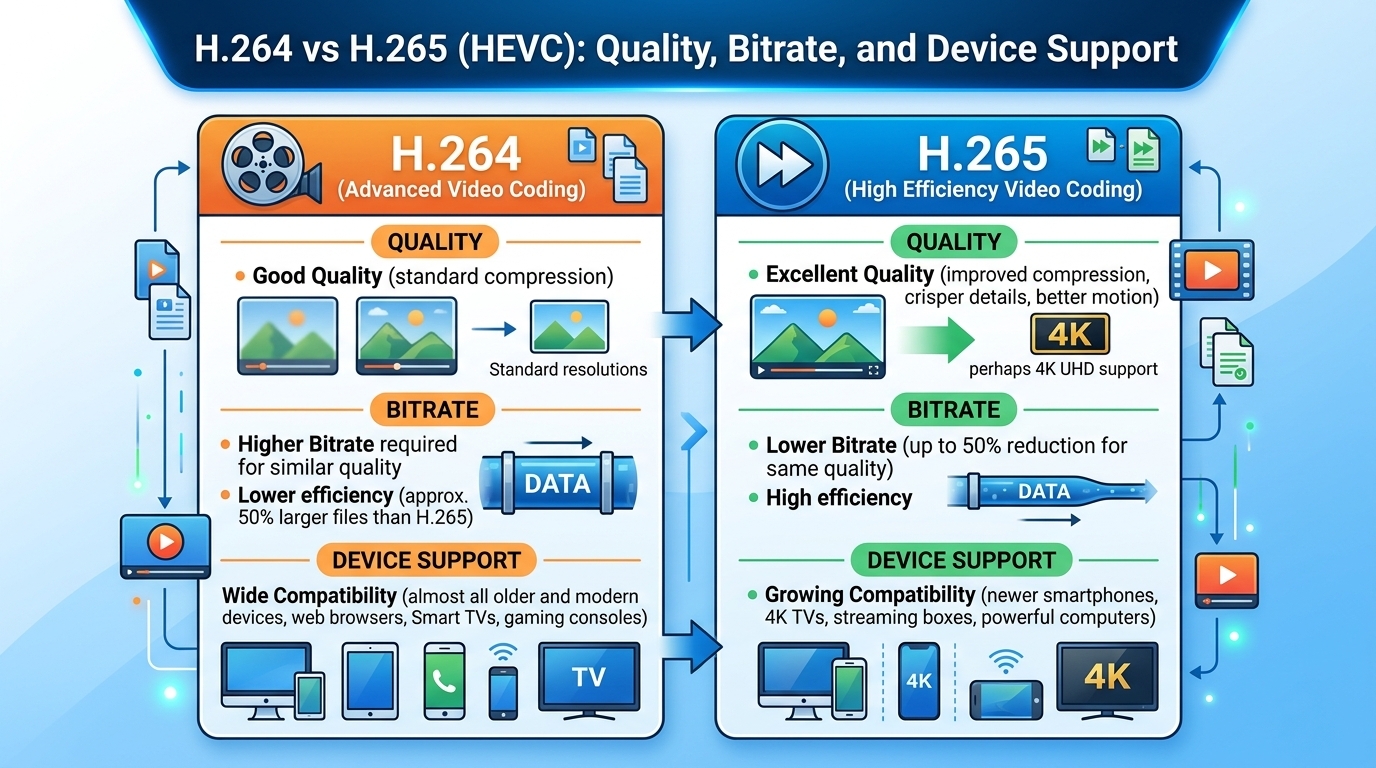
Evaluated October 2026: in the h264 vs h265 decision, HEVC (H.265) matches H.264 (AVC) quality at roughly 30 to 50 ...