

Learn
What Is H.264 (AVC)? The Codec Behind Most Online Video
H.264, also called Advanced Video Coding (AVC) or MPEG-4 Part 10, is a block-based video compression standard published ...
A single percentage-point improvement in cache-hit ratio across a 50 TB/month footprint eliminates roughly 500 GB of origin egress per cycle. At typical cloud-origin pricing, that translates to measurable cost savings every billing period. Yet as of Q1 2026, most CDN analytics implementations still treat edge logs as an afterthought—piped into a SIEM, queried during incidents, then ignored. That gap between the data teams collect and the data teams act on is where this playbook lives. What follows is a concrete framework for CDN log analysis that covers pipeline architecture, the metrics that actually move business outcomes, a failure-mode taxonomy most top-10 results skip entirely, and a workload-profile decision matrix for choosing the right analytics stack. If you already ship at scale, this is the peer-level reference you keep open in a second tab.
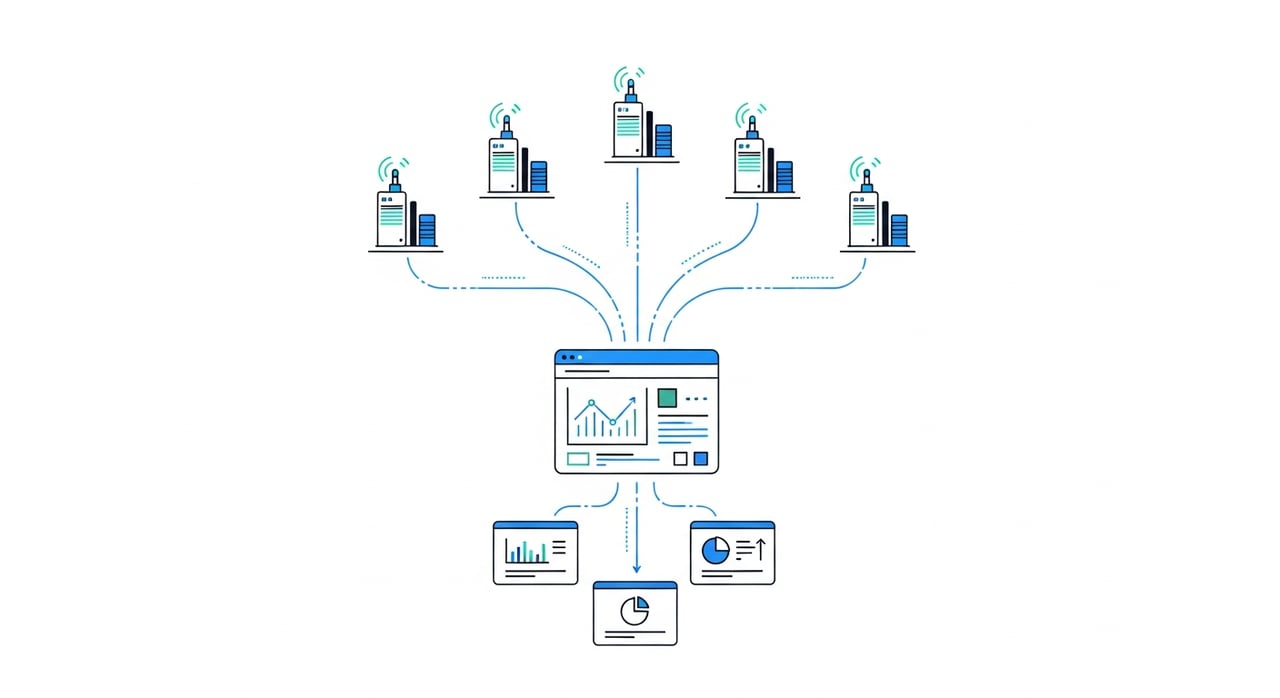
Two shifts define the 2026 landscape. First, HTTP/3 adoption crossed the 40% threshold of global web traffic by late 2025, and QUIC's connection-migration behavior generates log patterns that older parsing pipelines silently misclassify. If your log schema still keys sessions on four-tuple (source IP, source port, dest IP, dest port), you are under-counting unique sessions and over-counting cache misses. Second, edge compute is no longer experimental. Workers, edge functions, and Wasm-based request handlers now execute business logic at the CDN layer, which means edge logs carry application-level semantics—not just transport metadata. CDN access log analysis in 2026 must account for both of these realities or it produces misleading dashboards.
The log pipeline is load-bearing infrastructure. Treat it that way.
Most CDNs now expose real-time log streams via push (Kafka-compatible endpoints, HTTPS log push, gRPC streams) or pull (S3-compatible log buckets with sub-minute write latency). For real-time CDN analytics, push-based ingestion is non-negotiable—batch polling with five-minute granularity cannot detect cache-poisoning events or sudden origin spikes fast enough. Target end-to-end log latency from edge PoP to queryable store of under 30 seconds. Anything above 60 seconds degrades incident response.
Raw edge logs need three enrichment passes before they are useful: geo-IP resolution to city-level granularity, ASN tagging for network-path analysis, and session stitching for multi-request flows. In 2026, the most effective teams run these enrichments as stream processors (Flink, Kafka Streams, or Benthos) rather than batch ETL jobs. This keeps the data fresh enough for anomaly detection while avoiding the operational cost of maintaining a separate real-time and batch path.
ClickHouse continues to dominate edge-log analytics storage in 2026 for teams that self-host. Its columnar compression typically reduces raw JSON log volumes by 10–15x, and query performance on time-series aggregations at the billion-row scale remains unmatched at its price point. Managed alternatives like Hydrolix or Cribl Lake serve teams that want to avoid operational overhead. Regardless of backend, partition by time first, then by edge region or cache status—this aligns storage layout with the two most common query patterns.
Stop tracking 40 metrics on a dashboard nobody opens. Instrument these six, alert on thresholds, and review weekly.
| Metric | Why It Matters | 2026 Target Range |
|---|---|---|
| Cache-hit ratio (CHR) | Directly reduces origin load and egress cost | Static assets >95%, dynamic >60% with ESI/edge logic |
| P99 TTFB at edge | Captures tail-latency problems hidden by P50 | <150 ms for cache hits, <400 ms for cache misses |
| Error ratio (5xx / total) | Origin health signal; alert at 0.5%, page at 2% | <0.1% steady state |
| Origin offload % | Ratio of bytes served from edge vs origin; the cost lever | >85% for media-heavy workloads |
| Bandwidth per region | Capacity planning and multi-CDN routing decisions | Varies; trend analysis matters more than absolute |
| Request volume by status + content type | Detects bot surges, broken cache keys, unexpected purges | Stable day-over-day with seasonal adjustment |
How to track CDN cache hits and misses effectively: derive CHR from the cache-status response header (HIT, MISS, EXPIRED, STALE, REVALIDATED) rather than from a binary hit/miss flag. The distinction between EXPIRED and MISS is critical—high EXPIRED rates indicate your TTLs are too aggressive, not that your cache is cold.
Running multiple CDNs is standard practice for any organization above 100 TB/month. The problem is visibility fragmentation. Each provider exposes logs in a different schema, uses different cache-status taxonomies, and timestamps with different precision. Multi-CDN analytics requires a normalization layer that maps provider-specific fields to a canonical schema before data hits your analytics store.
The practical approach in 2026: define a canonical log schema with roughly 25 fields covering request metadata, cache outcome, timing breakdown (DNS, TLS handshake, TTFB, transfer), geo, and ASN. Write per-provider transform functions that emit this canonical format. Version the schema. When providers change their log format—and they do, without warning—your transforms break cleanly and visibly rather than silently corrupting your dataset.
For teams evaluating CDN cost alongside performance, BlazingCDN's comparison and pricing model is worth benchmarking against. BlazingCDN offers Anycast routing with built-in failover and volume-based pricing that scales from $5 per TB down to $2.50 per TB at volume (as of October 2026). For enterprises running multi-CDN analytics across large footprints, that cost delta compounds fast. Its flexible configuration makes it a serious contender when your analytics tell you it is time to rebalance traffic allocation.
This is the section most CDN analytics guides skip. When your log pipeline fails, your observability fails—and you fly blind during the exact moments you need data most. Here are the five failure modes we have seen repeatedly in production, ranked by blast radius.
The CDN provider's log-push endpoint hits a rate limit or encounters a transient error on your receiver. Logs are dropped with no error surfaced. Detection: maintain a heartbeat counter per PoP per minute. If any PoP goes silent for more than 2x its normal inter-log interval, alert. Recovery: most providers retain logs in a buffer for 1–4 hours. Trigger a backfill pull from the provider's log-storage API.
A CDN provider adds, renames, or removes a field in their log output. Your parser either crashes (best case) or silently maps data to the wrong column (worst case). Detection: validate a sample of each batch against a JSON Schema or Avro schema before writing to the analytics store. Recovery: pin your transform to a known schema version and alert on validation failures.
IP-to-location databases shift meaningfully every quarter as cloud providers reassign IP blocks. Stale geo data skews regional performance reports and routing decisions. Detection: compare your geo-enrichment output against a monthly sample of known-location test requests. Recovery: automate geo-database updates on a weekly cadence; MaxMind and IPinfo both support automated pulls.
In multi-CDN setups, one provider timestamps at request receipt, another at response completion. A 200 ms difference creates false latency comparisons. Detection: send synthetic requests through each CDN and compare the logged timestamps against your client-side measurement. Recovery: normalize all timestamps to a single semantic event (request receipt) and document the offset per provider.
Adding high-cardinality dimensions (full URL path, query strings, individual user IDs) to your analytics store causes index bloat, query slowdowns, and storage cost spikes. Detection: monitor tag cardinality per dimension weekly. Recovery: hash or bucket high-cardinality fields before indexing; store the raw values in a separate cold-storage tier for ad-hoc investigation.
| Workload Profile | Log Volume | Recommended Stack | Key Consideration |
|---|---|---|---|
| E-commerce (seasonal spikes) | 5–50 TB/mo | Managed ClickHouse + Grafana; or Datadog Log Analytics | Auto-scaling ingestion during flash sales; CHR correlation with conversion funnels |
| Video/streaming | 100 TB–2 PB/mo | Self-hosted ClickHouse cluster or Hydrolix; custom dashboards | Per-session bitrate tracking; rebuffer-ratio correlation with edge TTFB |
| SaaS (API-heavy) | 10–100 TB/mo | Elastic + Kibana or Cribl + ClickHouse | Per-endpoint error-rate tracking; tenant-level isolation in log queries |
| Gaming (latency-critical) | 20–200 TB/mo | Kafka Streams + ClickHouse; sub-second alerting via PagerDuty | P99 latency per region drives player retention; jitter matters as much as throughput |
The decision is not purely technical. At 100+ TB/month, managed analytics platforms charge enough that self-hosting a ClickHouse cluster often pays for itself within two quarters, especially if your team already operates Kubernetes infrastructure.
CDN monitoring for security in 2026 focuses on three log-derived signals: request-rate anomalies per IP/ASN (bot detection), geographic distribution shifts in traffic to sensitive endpoints (credential-stuffing indicators), and sudden cache-MISS spikes on URLs that should be cached (cache-poisoning attempts or targeted purge abuse). Feed these signals into your existing SOAR platform rather than building a separate alerting stack. The edge log is a sensor, not a SIEM—keep the boundary clean.
Privacy compliance remains a pipeline concern. Anonymize client IPs at the transformation layer before data lands in your queryable store. As of 2026, GDPR enforcement actions related to log retention have increased, and the safest posture is to hash client IPs with a rotating daily salt, preserving cardinality for analysis while eliminating PII from long-term storage.
Define a canonical log schema with 20–25 standardized fields. Write per-provider transform functions that normalize each provider's raw output into this schema. Version your schema, validate incoming data against it, and alert on validation failures rather than silently ingesting malformed records.
ClickHouse (self-hosted or managed) paired with Grafana remains the highest-performance option for most teams. Datadog and Cribl are strong managed alternatives. The technique that matters most is stream-based enrichment (geo, ASN, session stitching) before storage, not after—this prevents expensive query-time joins.
Use push-based log ingestion (Kafka-compatible or HTTPS push) with a target end-to-end latency under 30 seconds. Run enrichment as a stream processor. Alert on P99 TTFB, 5xx error ratio, and cache-hit ratio at one-minute granularity. Anything coarser than one-minute resolution is batch monitoring, not real-time.
For static assets, target above 95%. For dynamic or personalized content with edge-side includes, 60–75% is realistic. Improve CHR by auditing cache-key construction (remove unnecessary query parameters), extending TTLs where content staleness tolerance permits, and implementing stale-while-revalidate directives.
Monitor for sudden spikes in MISS status on URLs with historically high HIT rates. Correlate with unusual request headers or query-string variations in the same time window. If confirmed, purge the affected cache keys and audit your cache-key normalization rules to strip attacker-controlled inputs.
A three-node ClickHouse cluster on reserved cloud instances (c6a.2xlarge equivalent) with 10 TB of NVMe storage handles roughly 500 billion log rows per month and costs approximately $1,200–$1,800/month as of Q2 2026 pricing on major cloud providers. Compare this against managed log analytics platforms that charge $1.50–$3.00 per ingested GB to determine your break-even point.
Pick one metric from the table above that you are not currently alerting on. Instrument it. Set a threshold. Let it fire for a week and see what it surfaces. The most common starting point for teams new to serious CDN log analysis is deriving CHR from granular cache-status headers instead of a binary hit/miss flag—it is a single-afternoon change that immediately reveals whether your TTLs are working or your cache is churning through unnecessary revalidations. If you are running multi-CDN, build the canonical schema first; everything else depends on it. What is the first metric you plan to instrument?

Heavy traffic.
Light bill.
The CDN for video and large traffic
Learn
H.264, also called Advanced Video Coding (AVC) or MPEG-4 Part 10, is a block-based video compression standard published ...
Compare
At 100 TB a month, the published price gap between options for a CDN for static content is more than 16 times: ...
Learn
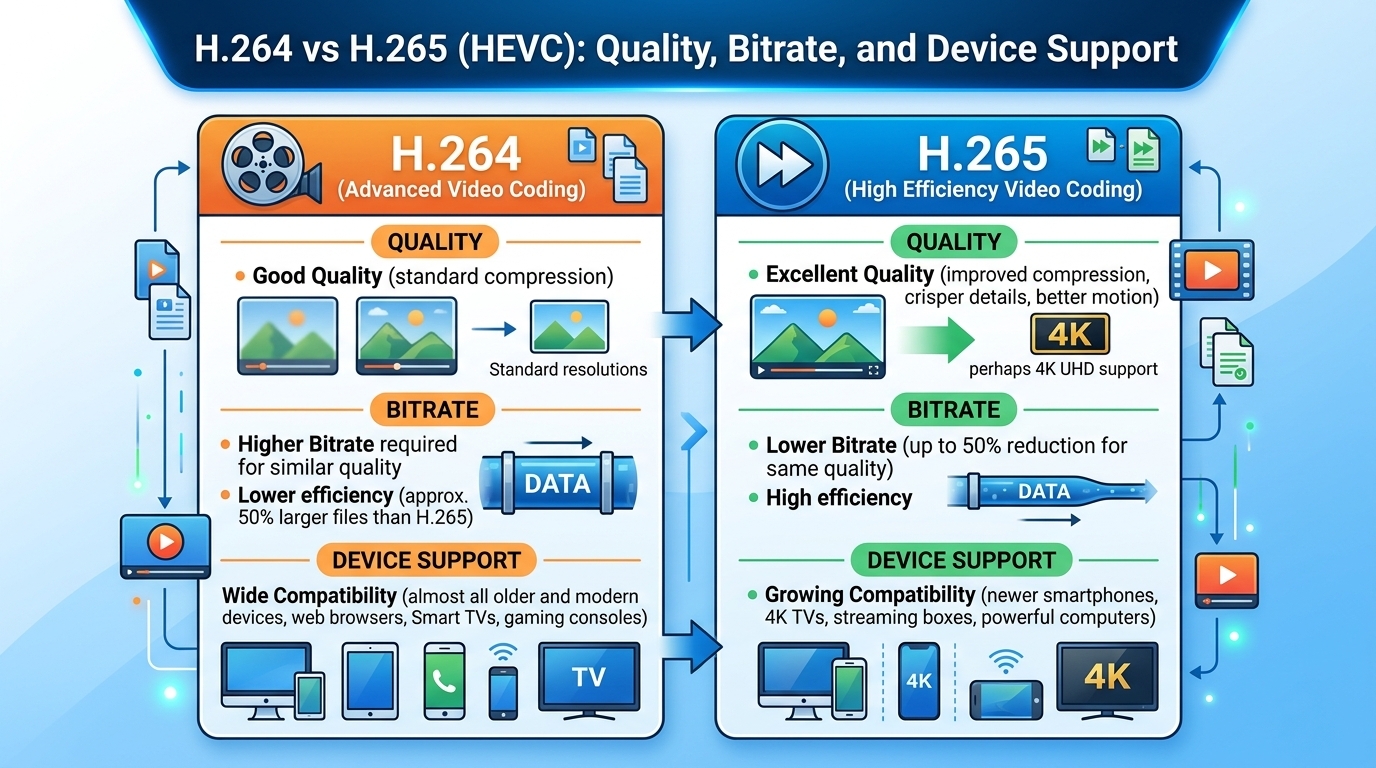
Evaluated October 2026: in the h264 vs h265 decision, HEVC (H.265) matches H.264 (AVC) quality at roughly 30 to 50 ...