
Learn
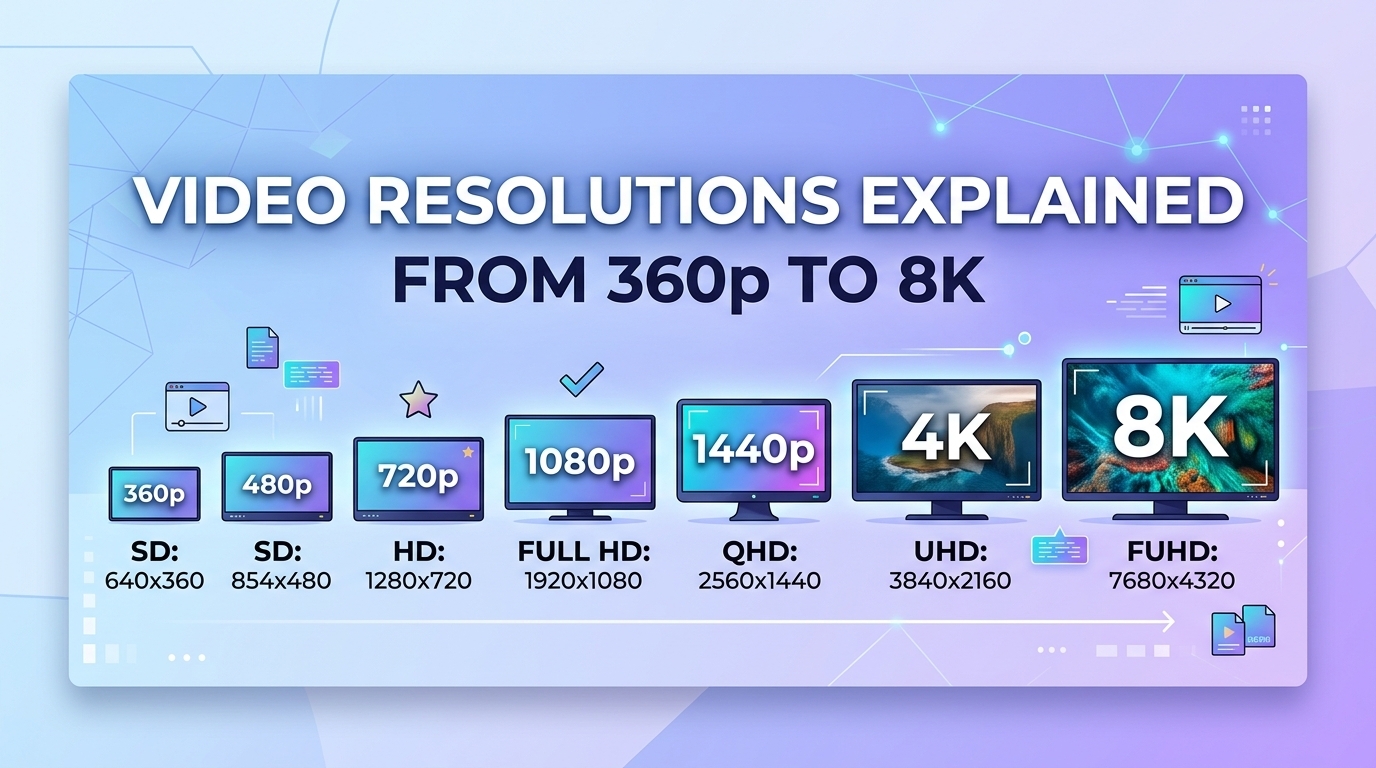
Video Resolutions Explained: From 360p to 8K
Video resolutions run from 360p (640 x 360, about 230,000 pixels) to 8K (7680 x 4320, about 33.2 million pixels), a ...
In 2026, most adaptive bitrate streaming failures on live channels come from the delivery path, not from the encoder. A ladder with rungs 1.5 to 2 times apart, Low-Latency HLS (LL-HLS) parts of about 0.5 seconds, and cache rules that treat playlists and segments as opposite kinds of objects will hold a stream roughly 2 to 3 seconds behind live. Get the playlist TTL or the cache key wrong, and the same stream slides back toward standard HLS latency or stalls. This playbook covers the ladder table, the part and segment settings, per-object cache-control, hls.js and video.js startup tuning, and a troubleshooting checklist. Applying it to one channel takes about an hour.
Adaptive bitrate streaming best practice as of 2026: space ladder rungs 1.5 to 2 times apart, set the LL-HLS PART-TARGET between about 0.33 and 1 second with PART-HOLD-BACK at three times that value, and cache segments for hours while caching playlists for less than one part duration. With 0.5-second parts, this arithmetic puts glass-to-glass latency near 2 to 3 seconds. Each viewer then sends about 4 requests per second instead of the 0.33 per second that 6-second standard HLS generates.
Standard HLS tolerates sloppy caching. A playlist that is one second stale costs little when segments last 6 seconds. LL-HLS removes that slack. The player issues blocking playlist reloads with the _HLS_msn and _HLS_part query parameters, fetches parts that are still being written, and requests the next part through EXT-X-PRELOAD-HINT before it exists.
Every one of those behaviors depends on edge behavior. The edge has to key the cache on the query parameters, hold connections open long enough for blocking requests, avoid caching early 404 responses, and collapse duplicate requests. When the edge gets any of these wrong, the player compensates by falling back from the live edge, by downshifting, or by both.
A good ladder gives the player a safe step in every direction. Use five to six rungs, keep the jump between adjacent rungs at 1.5 to 2 times, start the lowest video rung near 300 kbps so congested mobile users stay connected, and cap the top rung at the resolution your largest common screen actually renders.
| Rung | Resolution | H.264 video bitrate | Step to next rung down |
|---|---|---|---|
| 1 | 1920x1080 | 6,000 kbps | 1.7x |
| 2 | 1280x720 | 3,500 kbps | 1.75x |
| 3 | 960x540 | 2,000 kbps | 1.8x |
| 4 | 768x432 | 1,100 kbps | 1.7x |
| 5 | 640x360 | 650 kbps | 2.2x |
| 6 | 416x234 | 300 kbps | floor |
A step of no more than 2x between rungs means a downshift never cuts more than half of the delivered bitrate, and that is what keeps a switch invisible instead of jarring.
Treat this table as a starting point for mixed content, with 128 kbps AAC audio carried as a separate rendition. For high-motion sports, raise each rung by roughly 20 to 30 percent or use per-title encoding. HEVC and AV1 ladders commonly need 25 to 40 percent less bitrate for equal perceived quality, but the saving depends on the content, so measure it with VMAF on your own footage before you trim rungs. The bitrate ladder and CMAF deep dives in the video streaming CDN articles go further on per-title ladders and packaging.
For LL-HLS, use 2 to 4 second CMAF segments, a PART-TARGET of 0.33 to 1 second, and a PART-HOLD-BACK of three times PART-TARGET. Advertise CAN-BLOCK-RELOAD=YES, and set CAN-SKIP-UNTIL to at least six target durations so that delta playlists stay small.
| PART-TARGET | PART-HOLD-BACK | Estimated glass-to-glass latency | Requests per viewer per second (video only) |
|---|---|---|---|
| 0.2 s | 0.6 s | about 1 to 1.5 s | 10 |
| 0.33 s | 1.0 s | about 1.5 to 2.5 s | 6 |
| 0.5 s | 1.5 s | about 2 to 3 s | 4 |
| 1.0 s | 3.0 s | about 3.5 to 4.5 s | 2 |
Halving PART-TARGET saves about one second of latency and doubles request volume, so 0.5 seconds is the default to beat for most channels.
The latency column is an estimate: PART-HOLD-BACK plus a 0.5 to 1 second budget for encoding, packaging and delivery. The request column counts one part request plus one blocking playlist reload per part. Set the edge read timeout to the origin above the longest time a blocking request can wait, which is at least one target duration plus margin. A timeout shorter than one segment turns every hold into a 504 error.
Playlists and media need opposite rules. Media files have unique names and never change, so they can be cached for a long time. Live media playlists change every part, so they get a TTL below half of PART-TARGET and a cache key that includes _HLS_msn, _HLS_part and _HLS_skip.
| Object | Edge TTL | Cache key and notes |
|---|---|---|
| Multivariant playlist (live) | 30 to 120 s | Path only; changes only when the ladder changes |
| Media playlist, blocking request | a few seconds | Include _HLS_msn, _HLS_part and _HLS_skip; collapse concurrent misses |
| Media playlist, plain request | below half of PART-TARGET | Serves tune-in and legacy clients |
| Parts and full segments | hours to days | Immutable; stream in-progress parts and never cache a truncated body |
| Init segment, VOD playlists | days or longer | Version the path when the encoding changes |
| 404 on part paths | 0 to 1 s | A cached early 404 breaks every viewer on that edge |
The single most damaging edge rule in LL-HLS is negative caching on part paths, because one premature request poisons the next part for an entire region.
Several edge settings sit outside the cache rules and matter just as much:
Startup time depends mostly on which rung the player picks first and on how many round trips happen before the first frame. Start on a middle rung with a realistic bandwidth estimate, cap renditions to the player size, and let the player catch up to the live edge gradually instead of seeking.
| Player option | Suggested setting | Why |
|---|---|---|
| hls.js lowLatencyMode | true | Enables part loading and blocking reloads |
| hls.js abrEwmaDefaultEstimate | near your audience median, not the 500 kbps default | Avoids a low-quality first segment on good networks |
| hls.js abrBandWidthUpFactor | 0.6 to 0.7 | Upgrade hysteresis for short parts |
| hls.js capLevelToPlayerSize | true | No 1080p in a 400-pixel embed |
| hls.js maxLiveSyncPlaybackRate | 1.05 to 1.1 | Catches up to the live edge without a seek |
| video.js VHS useBandwidthFromLocalStorage | true | Returning viewers start at their last measured rate |
| video.js VHS limitRenditionByPlayerDimensions | true | Same effect as capping to player size |
A sensible initial bandwidth estimate does more for startup time than any other option, because it decides whether the first segment downloads at 300 kbps or 2,000 kbps.
For video.js, confirm that your VHS version parses LL-HLS. Older releases put it behind an experimental flag, and many teams load hls.js through a plugin for live streams instead.
HLS adaptive bitrate logic estimates throughput from download timing, but LL-HLS parts arrive at the encoder's pace, not at link speed. A 0.5-second part streamed as it is produced takes about 0.5 seconds whatever the link capacity, so the estimate collapses toward the current bitrate and the player rarely upgrades.
To counter this, measure throughput on complete segments or on parts that were already finished when requested. Raise the hls.js abrEwmaFastLive half-life so a single slow sample cannot trigger a switch. Require headroom across about three part durations before stepping up.
LL-HLS barely changes the bytes delivered, but it multiplies requests. Here is a worked example using the earlier table. A 50,000-viewer event at 0.5-second parts sends 50,000 x 4 = 200,000 requests per second for video. At 0.33-second parts the figure is about 300,000. Demuxed audio with its own parts roughly doubles both numbers.
Over a two-hour event, 200,000 requests per second adds up to 1.44 billion requests. At a hypothetical $0.01 per 10,000 requests, that is $1,440 in request fees on top of egress, for one event. Price the request line, not just the per-GB rate, before choosing a part size.
The BlazingCDN HLS Streaming CDN delivers pre-encoded HLS, LL-HLS and DASH with unlimited requests, no request fees, and origin shield and request coalescing included. It serves over HTTP/2 and TLS 1.3 and does not support HTTP/3, which matters if most of your audience is on lossy mobile networks.
Before changing the encoder, check the CDN. If the p99 playlist fetch time, measured from the time the part was published, exceeds PART-TARGET, the delivery path is the bottleneck. Instrument these signals before rollout:
Spot-check the Age and Cache-Control response headers on playlist and part responses from at least two regions. A playlist response with an Age larger than PART-TARGET confirms stale caching.
Rollback is cheap because LL-HLS is backward compatible: clients that ignore part tags play the full segments. Put the player's lowLatencyMode setting behind a feature flag, and keep the previous edge rule set versioned. Define the rollback trigger in advance, for example startup p95 or rebuffer ratio worse than the standard HLS baseline over 30 minutes. A middle option is to raise PART-TARGET to 1 second.
| Symptom | Likely cause | Fix |
|---|---|---|
| Latency drifts from 2 s to 5 s or more | Playlist TTL too long, or _HLS params stripped from the cache key | Key on the params; TTL below half of PART-TARGET |
| Bursts of 404s on new parts | PRELOAD-HINT request served from a stale playlist, then negatively cached | Hold the hinted request at the origin; no 404 caching on parts |
| Origin spikes at each part boundary | Thundering herd on the first request for a part | Coalesce at the shield; stream in-progress bodies |
| Quality oscillates every few seconds | Throughput samples from short parts | Upgrade hysteresis; longer EWMA half-life |
| Stalls after regional failover | Packagers out of sync on media sequence numbers | Deterministic numbering from a shared timing source |
| Players disagree on the live edge | Clock drift on encoders or packagers | NTP everywhere; alert on drift as an SLI |
| Large playlists on every reload | _HLS_skip dropped, so delta updates are never used | Preserve _HLS_skip end to end |
Five of the seven rows are fixed at the edge or the packager, not in the encoder, which is why delivery deserves the first look.
Space ladder rungs 1.5 to 2 times apart, align keyframes across every rung, and keep playlists and segments under separate cache rules. For live HLS, cache playlists briefly and segments for a long time, start players on a middle rung with a realistic bandwidth estimate, and add upgrade hysteresis so that short throughput dips do not trigger visible quality oscillation.
Start with a 0.5-second PART-TARGET and a 1.5-second PART-HOLD-BACK, which typically lands LL-HLS near 2 to 3 seconds of latency. Dropping to 0.2 seconds can reach about 1 to 1.5 seconds, but it more than doubles playlist and part requests per viewer and leaves the player with noisier throughput samples for ABR decisions.
HLS adaptive bitrate players estimate throughput from download timings, smooth the estimate with moving averages, and choose the highest rung that fits under a safety factor. With LL-HLS, parts arrive at encoding speed, so these estimates understate link capacity. Measure on complete segments where possible and require sustained headroom before upgrading.
Cache LL-HLS media playlists for less than half of PART-TARGET, with _HLS_msn, _HLS_part and _HLS_skip in the cache key. Parts, full segments and init segments are immutable, so hours to days is safe. Never cache 404 responses on part paths for more than about one second, because one early request can break playback for a whole edge location.
LL-HLS keeps delivered bytes roughly the same but multiplies request volume, about 12 times at 0.5-second parts compared with 6-second standard HLS segments. On a provider that charges per request, a 50,000-viewer event can add four figures in request fees. On traffic-only billing, the cost difference comes down to origin and shield load.
Pick one live channel and instrument four numbers for a full day: p99 playlist fetch time against PART-TARGET, cache hit ratio and 404 count on part paths, time to first frame, and distance to the live edge from EXT-X-PROGRAM-DATE-TIME. Then change one variable at a time, starting with the playlist cache key and negative caching, before you touch the encoder. Write the rollback trigger down before the first change ships.
If your segments are already packaged and request fees are inflating your live bill, BlazingCDN offers a 14-day testing period on real production traffic at $5 per TB with the monthly minimum waived, and the OTT and VOD streaming CDN page explains how to run that test on your HLS and LL-HLS streams.

Heavy traffic.
Light bill.
The CDN for video and large traffic
Learn
Video resolutions run from 360p (640 x 360, about 230,000 pixels) to 8K (7680 x 4320, about 33.2 million pixels), a ...
Learn
cdnjs is an open-source public JavaScript CDN that serves more than 4,000 libraries (2025 index size) from Cloudflare's ...
Learn
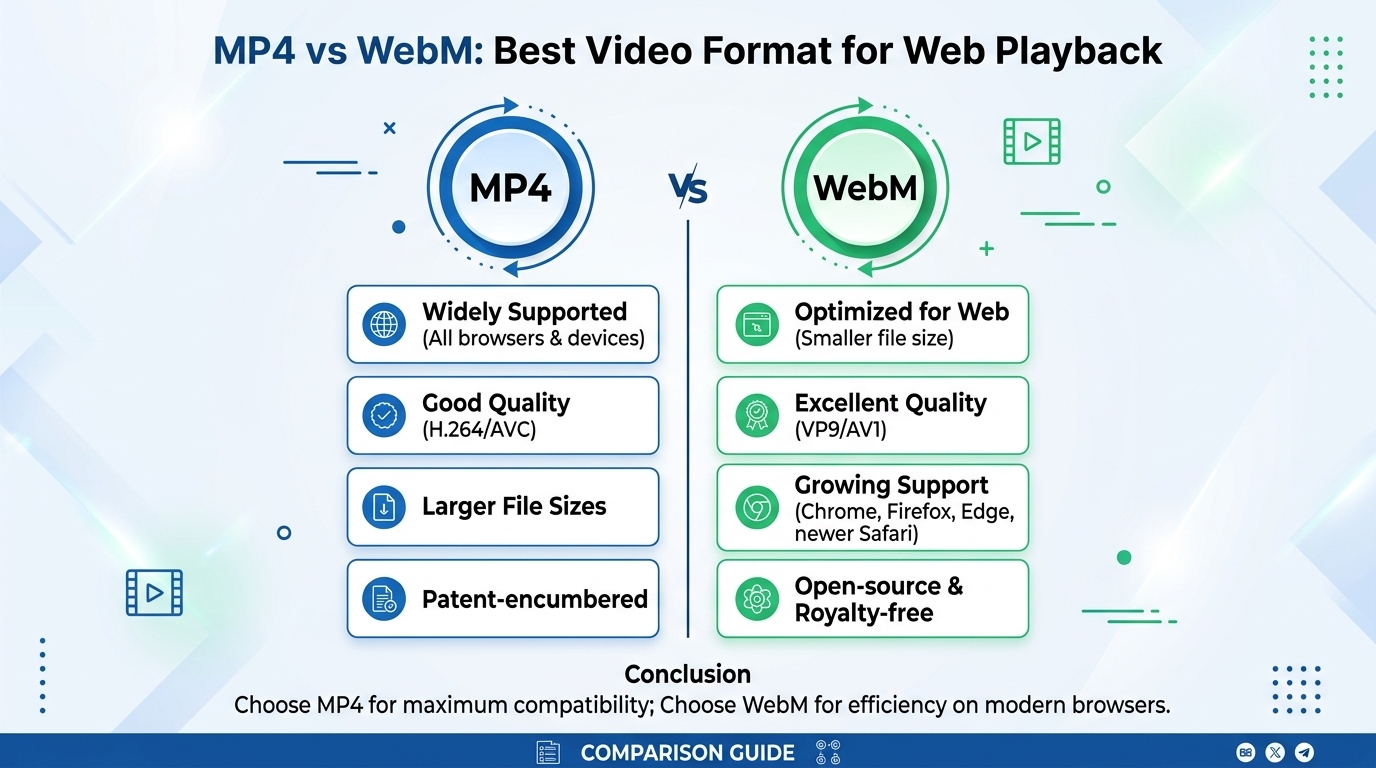
For web playback in 2026, ship MP4 (H.264 video, AAC audio) as the universal baseline and add WebM (VP9 or AV1) as a ...