<p><img src="https://matomo.blazingcdn.com/matomo.php?idsite=1&amp;rec=1" style="border:0;" alt="">
Skip to content

How a CDN Works: Behind the Scenes of Content Delivery

Google discovered that when search results slowed by just 400 milliseconds—less than the blink of an eye—users performed 0.44% fewer searches per user. At Google scale, that tiny delay meant millions of lost queries and ad impressions. That is the brutal reality of the modern internet: if your content is slow, users silently disappear.

Content Delivery Networks (CDNs) exist to make sure that never happens. They sit between your origin servers and your users, quietly accelerating every image, API call, video chunk, and software update you deliver—often cutting latency by 50% or more. Yet for many teams, a CDN still feels like a black box.

This article opens that box and walks through, step by step, how a CDN works behind the scenes: from DNS resolution and caching logic to TLS, edge logic, and real-world performance impact. Along the way, you’ll see how to think about CDN architecture as a strategic component of your infrastructure, not just a “speed add-on.”

Why the Internet Needs CDNs in the First Place

To understand how a CDN works, you first need to understand why it exists. Without a CDN, every request for your site, app, or stream has to travel all the way to your origin servers—often sitting in a single cloud region or data center. That distance is the enemy.

The physics problem: latency and distance

Even at the speed of light in fiber, a signal between London and Singapore takes around 150–180 ms round trip. Add routing overhead, TLS handshakes, and TCP slow start, and your users might wait 500 ms or more before the first byte of data even arrives. Multiple page resources multiply that penalty.

Research from Google and Deloitte has shown that a 0.1 second improvement in mobile site speed can increase conversion rates by up to 8–10% for retail and B2B sites (source: Deloitte, “Milliseconds Make Millions”, 2020). That’s why shaving off a few hundred milliseconds is not micro-optimization—it’s revenue.

Ask yourself: if your highest-value customers are a continent away from your origin, how much money are you leaving on the table every time a page or stream hesitates?

The capacity problem: origin overload

When every user hits your origin directly, two things happen:

  • Your infrastructure costs grow linearly with your traffic.
  • Your blast radius for outages becomes enormous—one origin hiccup, global impact.

CDNs solve both problems by caching and processing content closer to users. Instead of your origin serving millions of identical copies of the same image, script, or video segment, it serves it once per edge location, and the CDN takes over repetitive delivery work.

As you keep reading, think about where your current bottleneck is: distance, capacity, or both? That answer will shape how you use a CDN.

What a CDN Actually Is: Core Building Blocks

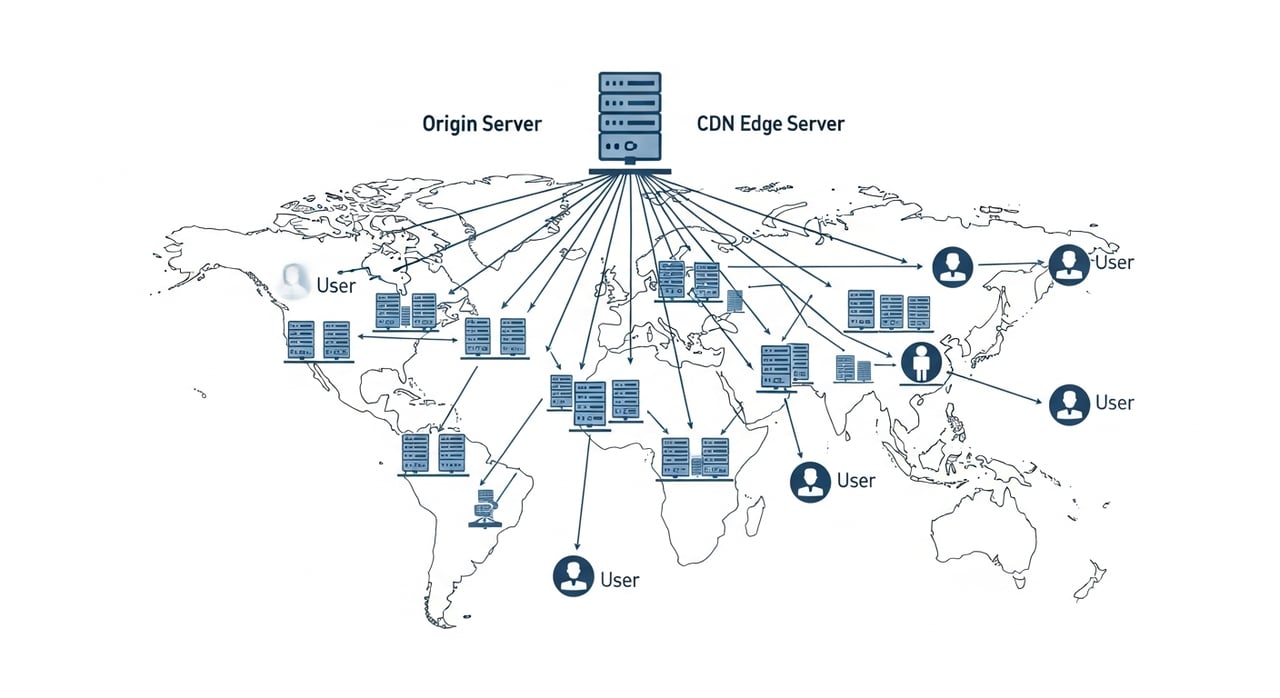
A CDN is not just “servers across the world.” It’s a combination of hardware, software, routing logic, and control systems. At a high level, most CDNs share these components:

  • Edge servers: Caching and processing nodes where user requests terminate.
  • Routing layer: DNS and anycast mechanisms that steer users to the “best” edge.
  • Control plane: Configuration, APIs, analytics, and policy management.
  • Storage & cache: Systems that hold and manage cached content across the network.
  • Security & TLS: Termination of HTTPS, certificates, and request filtering.

But understanding how a CDN works requires following a single user request from browser to edge to origin and back. That’s where the magic—latency reduction, offload, and resilience—actually happens.

As you move through the next sections, keep your own application in mind: which part of this lifecycle do you control today, and which parts could a modern CDN handle better?

Step 1: DNS – How Traffic Gets to the CDN

Everything starts with DNS. When a user types your domain (say, www.example.com) into a browser:

  1. The browser asks the DNS resolver (often their ISP, enterprise resolver, or a public resolver like 1.1.1.1) for the IP of www.example.com.
  2. Your authoritative DNS server responds with a CNAME pointing to the CDN domain (e.g., www.example.com CNAME customer.cdnprovider.net).
  3. The resolver then queries the CDN’s authoritative DNS, which returns an IP—usually an anycast address that maps to a nearby edge server.

Anycast: one IP, many locations

Most modern CDNs use anycast routing: the same IP prefix is advertised from many edge locations. BGP (the internet’s routing protocol) then sends users to the “closest” location in routing terms, not necessarily geographic distance but lowest network cost and latency.

This makes failover and scaling transparent. If an edge location is unreachable, BGP simply routes around it, and traffic lands on another edge advertising the same prefix.

Tip: When you integrate a CDN, designing DNS carefully—short TTLs for CDN CNAMEs, long TTLs for your apex domain, and clear separation of static vs. dynamic hostnames—gives you more control during migrations and incidents.

Ask yourself: do you know exactly which hostnames should go through your CDN and which should always hit origin directly (e.g., admin panels, sensitive APIs)? If not, your next architecture diagram should start with DNS.

Step 2: The Edge Receives the Request

Once DNS has resolved to a CDN IP, the user’s browser connects to the closest edge server. This is where TLS, connection optimization, and the decision to serve from cache or origin begins.

TLS termination and connection optimization

The CDN terminates HTTPS/TLS at the edge. That means:

  • The TLS handshake happens near the user, reducing latency.
  • The CDN can reuse long-lived, optimized connections to your origin.
  • Modern TLS features (HTTP/2, HTTP/3/QUIC, OCSP stapling) can be handled at scale.

For high-traffic applications, this multiplexing of many user connections onto a smaller pool of optimized origin connections significantly reduces CPU and network overhead on your servers.

Reflection point: Is your origin currently terminating all TLS itself? If so, how much CPU are you spending on decryption and handshakes that could be offloaded to the CDN edge?

Step 3: Cache Hit vs. Cache Miss – The Heart of CDN Behavior

Once the request reaches the edge server, the CDN must answer a fundamental question: “Do I already have this content?” This is the cache hit vs. cache miss decision.

How the CDN decides what to cache

The CDN typically uses a combination of:

  • URL path and query string: e.g., /images/logo.png may be cacheable, while /api/cart?user=123 may not.
  • HTTP methods: GET and HEAD are usually cacheable; POST, PUT, DELETE, and PATCH are not.
  • Cache-control headers: Cache-Control, Expires, ETag, and Last-Modified define how long to cache and validation rules.
  • Cookies and headers: Some CDNs let you control whether to vary cache by cookie, header, or device type.

In a well-tuned setup, you explicitly tell the CDN what is cacheable and for how long. The result is higher cache hit ratio (CHR) and greater origin offload.

What happens on a cache hit?

If the object is present in the edge cache and still fresh:

  • The CDN immediately serves the content from memory or local disk.
  • Latency is limited mostly to the user-edge distance—often a few milliseconds to tens of milliseconds.
  • Your origin server is completely bypassed.

For static resources (images, JS, CSS, font files, documents), hit ratios above 90% are achievable when cache policies are well defined. That can translate into 60–80% reduction in origin bandwidth.

What happens on a cache miss?

If the content is not in cache, or has expired:

  1. The edge server forwards the request to your origin, over an optimized connection (often via a mid-tier cache or origin shield node for extra protection).
  2. The origin generates or returns the response.
  3. The CDN stores the response in its cache according to cache rules and headers.
  4. The CDN sends the response back to the user.

Subsequent users requesting the same resource get the cached copy, dramatically reducing origin load.

Practical question: have you measured your current cache hit ratio? If you’re below 70% for static content, there is almost certainly misconfigured caching you could fix—often leading to immediate cost and performance wins.

Edge Logic: More Than Just Caching

Modern CDNs are no longer simple caches. They act as programmable edge platforms where you can execute logic close to your users: rewrites, redirects, header manipulation, or even full serverless functions.

Common use cases for edge logic

  • Device and locale targeting: Serve different variants based on device type, language, or region without round-tripping to origin.
  • A/B testing and experiments: Route a percentage of traffic to alternative backends or content versions at the edge.
  • Access control: Enforce geo-based rules or token-based access for specific content types.
  • API request shaping: Rewrite API paths or add authentication headers before hitting microservices.

In many organizations, logic that used to live inside monolithic applications is gradually shifting out to the CDN edge—simplifying origin code and improving performance.

Consider: which parts of your current application logic do not strictly require access to your core database? Those are prime candidates for edge-based implementation.

How CDNs Handle Dynamic and API Traffic

Not everything can be cached. Personalized dashboards, checkout flows, financial data, and many SaaS interactions require fresh responses for each user. Still, CDNs play a crucial role for dynamic content.

TCP and TLS optimization for APIs

Even when responses are uncacheable, CDNs reduce latency by:

  • Terminating user connections nearby and maintaining long-lived, warm connections to origin.
  • Using HTTP/2 or HTTP/3 between client and edge, even if your origin only supports HTTP/1.1.
  • Reducing TLS handshake overhead by reusing sessions and applying modern cipher suites.

For API-heavy applications, this often translates into measurable gains in P50 and P95 latency, especially for users far from the origin region.

Microcaching and edge-side includes

Some dynamic content is “semi-static”—search result pages, news homepages, or leaderboards that can tolerate being a few seconds old. For this, CDNs support:

  • Microcaching: Caching responses for 1–10 seconds, dramatically reducing origin load during spikes while keeping content effectively real time.
  • Fragment caching (ESI): Caching static fragments of a page (e.g., header, footer, recommendations) while pulling in dynamic blocks at request time.

These patterns are heavily used by large media and e-commerce platforms to balance personalization with performance.

Ask yourself: which of your “dynamic” endpoints actually return the same response for many users within short windows? Those are opportunities for microcaching that a CDN can handle elegantly.

Streaming Media and Video: How CDNs Keep Viewers Watching

Video streaming is one of the heaviest uses of CDNs, accounting for a large share of global downstream traffic. For platforms using HLS or DASH, video is delivered as many small segments (e.g., 2–6 seconds each) at multiple bitrates.

Segmented delivery and adaptive bitrate

Here’s what happens behind the scenes for streaming via a CDN:

  1. The player requests a manifest file (.m3u8 or .mpd) from the CDN.
  2. The manifest points to many segment URLs at different quality levels.
  3. The player requests segments one by one, selecting the bitrate based on network conditions.
  4. The CDN caches each segment as it is requested, so popular content quickly becomes entirely edge-resident.

Because segments are typically identical for all viewers of a given stream at a given quality, cache hit ratios can be very high, especially for on-demand content and major live events.

Buffering, rebuffering, and user abandonment

According to Conviva’s streaming performance reports, just a few percentage points increase in rebuffering (video freezing while loading) can increase viewer abandonment and churn. A well-architected CDN setup minimizes rebuffering by:

  • Reducing RTT (round-trip time) for segment requests.
  • Keeping popular segments hot in edge cache.
  • Isolating origin from flash crowds when new episodes or events launch.

For media companies, the difference between a smooth premiere and a stuttering stream often comes down to how effectively the CDN handles cache warming, segment distribution, and peak concurrency.

Reflection: do you know your platform’s average start time to first frame, rebuffering ratio, and abandonment rate by region? If not, integrating CDN performance analytics with QoE metrics should be a priority.

How CDNs Improve SEO and Core Web Vitals

Search engines have made it clear: user experience metrics like page speed now directly influence rankings. A CDN affects several key performance indicators used in Google’s Core Web Vitals.

Impact on Core Web Vitals

  • Largest Contentful Paint (LCP): Faster delivery of hero images, CSS, and critical JS reduces the time before the largest element is visible.
  • First Input Delay (FID)/Interaction to Next Paint (INP): While primarily driven by JavaScript execution, reduced network overhead means the browser can start executing scripts sooner.
  • Cumulative Layout Shift (CLS): Not directly a CDN function, but faster delivery of fonts and CSS reduces “late-arriving” assets that cause layout jumps.

Akamai’s performance studies have shown that sites using CDNs can see up to 50% improvement in TTFB and significant gains in conversion rates. Google’s own findings indicate that as page load goes from 1 to 3 seconds, the probability of bounce increases by 32% (source: Google/SOASTA).

Practical tip: use your CDN to serve your full static asset stack (images, fonts, JS, CSS, web manifests). Combine this with proper cache-control headers and compression to maximize your Core Web Vitals gains.

Question: are your lighthouse and PageSpeed Insights scores reflecting CDN-accelerated delivery? If not, inspect which resources are still loading directly from origin.

Cost, Offload, and Performance: A Simple Comparison

To see how a CDN changes your economics and performance profile, it helps to compare direct-origin delivery with CDN-accelerated delivery at a high level.

Aspect Direct from Origin Only With CDN in Front
User latency Dependent on distance to single region; often 100–300 ms RTT for remote users Edge delivery often cuts RTT to tens of ms; 20–60% faster TTFB
Origin bandwidth All traffic hits origin; costs grow linearly with user base 50–90% offloaded for cacheable content; origin sized for miss traffic only
Scalability Scale vertically/horizontally for big events; risk of overload CDN absorbs spikes; origin protected behind cache and optimized connections
Resilience Single-region or multi-region complexity; wide blast radius Edge-level isolation; traffic rerouted at routing level if an edge location fails
Infrastructure cost High compute and egress costs from cloud/origin provider Lower origin footprint; CDN egress often significantly cheaper at scale

Think about your current cost center: is it cloud egress, CPU for TLS, or over-provisioned servers for rare peak events? A CDN can dramatically reshape that cost curve when deployed thoughtfully.

What Makes a Modern CDN Like BlazingCDN Different?

Not all CDNs are created equal. Some prioritize broad feature sets, others lean on massive legacy infrastructure, and a newer generation focuses on performance, transparency, and cost efficiency. This is where providers like BlazingCDN stand out for enterprises that need both speed and predictability.

BlazingCDN is designed as a modern, high-performance CDN that delivers stability and fault tolerance on par with Amazon CloudFront, while being significantly more cost-effective. For enterprises pushing large volumes of static assets, streams, or downloads, starting at just $4 per TB ($0.004 per GB) with 100% uptime makes a meaningful difference at scale—especially when monthly transfer is measured in tens or hundreds of terabytes.

Large media platforms, SaaS players, game publishers, and software vendors use BlazingCDN to reduce infrastructure spend, protect their origins from surges, and scale new launches without dramatic capacity planning cycles. With flexible configuration options and enterprise-ready features, it’s increasingly chosen by organizations that prioritize both reliability and efficiency in their content delivery stack.

If you’re evaluating providers, BlazingCDN’s transparent, usage-based model and strong feature set are summarized on its product overview page: discover BlazingCDN features tailored for modern enterprises.

Question for your roadmap: if you could cut your CDN or egress spend substantially without sacrificing CloudFront-level reliability, what new initiatives could that budget unlock?

Industry-Specific Views: How a CDN Works for Different Use Cases

The core mechanics of a CDN are the same everywhere, but how they’re applied differs by industry. Let’s look at several real-world patterns.

Media and entertainment platforms

News portals, OTT streaming platforms, sports broadcasters, and music services rely heavily on CDNs to ensure consistent quality of experience (QoE) during peak events. Typical patterns include:

  • Heavy caching of on-demand assets (VOD libraries, article images, thumbnails).
  • Segment caching and origin shielding for live streams.
  • Regional blackouts or rights-based restrictions enforced at the edge.

CDNs reduce the risk of origin overload during premier episodes or breaking news, and they keep first-frame times low even when millions of users join simultaneously.

BlazingCDN is particularly attractive for media companies that move large amounts of video and static assets daily: its pricing structure and robust performance allow them to maintain CloudFront-grade dependability at a fraction of the cost, which is crucial for ad-supported and subscription-driven margins. For more details on media-specific workflows and optimizations, you can explore how BlazingCDN supports media and streaming platforms.

Ask yourself: if your next big live event doubles your usual viewership, can your current delivery chain absorb the spike gracefully?

SaaS and web applications

SaaS platforms and web apps mix static assets and dynamic APIs. For them, CDNs primarily:

  • Accelerate front-end delivery (JS bundles, CSS, fonts, SPAs).
  • Optimize API latency through connection reuse and regional edge routing.
  • Reduce origin egress by caching user-uploaded assets and shared resources.

Many SaaS teams see immediate improvements in sign-up conversion, dashboard responsiveness for remote users, and overall customer satisfaction once a CDN is correctly integrated and tuned.

Challenge: have you segmented your static and dynamic domains (e.g., static.example.com vs api.example.com) to give your CDN maximal flexibility in caching and optimization?

Software distribution and gaming

Game publishers, enterprise software vendors, and device manufacturers use CDNs heavily for binary distribution: patches, installers, DLC, and firmware updates. These files are large, frequently accessed during releases, and cost-intensive to deliver directly from cloud origins.

A CDN reduces both user download time and provider costs by caching large binaries globally. For game launches and patch days, the ability to push terabytes of data quickly without crushing the origin is a core business requirement.

Think about your next major release: do you have a plan that ensures last-mile performance for users on congested or distant networks, not just those near your primary data center?

Caching Strategy: How to Make the CDN Work for You

Deploying a CDN is step one; tuning it is where the real benefits appear. A well-designed caching strategy starts with understanding your content types and their change frequency.

Key principles of effective caching

  • Immutable assets: Version your JS/CSS and media filenames (e.g., app.9f1c3.js) and set very long cache lifetimes (months or a year) with Cache-Control: public, max-age=31536000, immutable.
  • Short-lived dynamic content: For content that updates frequently but not instantly (e.g., news homepages), use short TTLs (30–300 seconds) or microcaching.
  • Validation vs. expiration: Use ETag and Last-Modified headers to allow the CDN to validate content efficiently with If-None-Match and If-Modified-Since requests.
  • Selective vary: Only vary cache by headers or cookies that truly change content (e.g., language); avoid over-varying, which explodes cache keys.

Cache invalidation and purge

You rarely want to wait out the full TTL when deploying critical changes. That’s where cache purge or invalidation APIs come in. Most CDNs support:

  • URL-based purge: Invalidate specific paths.
  • Tag-based purge: Purge by cache tags associated with groups of objects.
  • Global purge: Clear entire zones (use sparingly).

In a CI/CD world, integrating purge operations directly into your deployment pipeline gives you predictable rollout behavior—new assets go live across the edge within seconds rather than hours.

Question: is cache invalidation an ad-hoc manual operation in your organization, or a first-class step in your deployment process?

Reliability and Fault Tolerance: Staying Online Under Stress

One of the least visible but most important aspects of a CDN is how it behaves under failure. Network partitions, regional issues, and origin incidents are inevitable at scale. A robust CDN mitigates their impact.

Origin failover and shielding

Many CDNs allow you to configure primary and secondary origins. If the primary is unreachable or returns errors above a threshold, the CDN can automatically switch to a backup.

Additionally, using an origin shield (a single aggregation layer that all edge servers use to fetch from your origin) reduces the number of direct connections your origin has to handle. This makes caching more effective and protects origin resources during high load.

Edge routing resilience

When an edge location experiences issues, anycast and health checks ensure traffic is rerouted to a healthy location advertising the same prefix. To users, this often appears as a minor latency change rather than a full outage.

BlazingCDN’s architecture is built around this expectation of failure, providing 100% uptime and fault tolerance behavior that matches what enterprises expect from providers like Amazon CloudFront—but at a meaningfully reduced cost threshold. For teams that need global reach with predictable availability, this combination is particularly compelling.

Ask yourself: when your primary cloud region has issues, does your current delivery chain degrade gracefully, or do your users see outright failures?

Measuring CDN Impact: Metrics That Actually Matter

To ensure your CDN is working as intended, you need to monitor the right metrics and connect them directly to user and business outcomes.

Core technical metrics

  • Cache hit ratio (CHR): Percentage of requests or bytes served from cache vs. origin.
  • TTFB (Time to First Byte): Tracked per region, browser, and device—compare with and without CDN.
  • Origin offload: Reduction in origin requests and bandwidth.
  • Error rates: 4xx/5xx rates at edge vs. origin to distinguish client behavior from infrastructure problems.

User and business metrics

  • Bounce rate and session duration: Improved load times often correlate with better engagement.
  • Conversion rate: Track changes after CDN optimization passes.
  • Streaming QoE: Start-up time, rebuffering ratio, average bitrate delivered.

Studies from Google and others have repeatedly correlated faster pages and streams with higher conversions and lower abandonment. Treat the CDN as a lever on those metrics—not just an infrastructure line item.

Reflection: do your dashboards show “before and after CDN change” trends for latency and business KPIs, or are infra metrics and product metrics still siloed?

Practical Checklist: Preparing Your Stack for a CDN

Before or during CDN deployment, run through a practical readiness checklist:

1. Inventory your content

  • List static assets (images, JS, CSS, fonts, documents).
  • Identify semi-static pages (homepages, category pages, search results).
  • Mark strictly dynamic APIs and endpoints.

2. Define caching policy

  • Set clear cache TTLs per content type.
  • Enable immutable caching for versioned assets.
  • Plan microcaching for safe dynamic endpoints.

3. Review DNS and SSL/TLS

  • Plan CNAMEs and hostnames that will be fronted by CDN.
  • Ensure certificate management is automated and compatible with your chosen CDN.

4. Integrate purge into CI/CD

  • Add purge-by-URL or tag steps to deployment pipelines.
  • Define rollback strategies that include CDN cache behavior.

5. Set up monitoring

  • Capture CHR, TTFB, and origin offload metrics.
  • Align them with product KPIs in a single observability stack.

Challenge: how many of these items are already formalized in your runbooks, and which ones are handled ad hoc by whoever “knows the CDN best” on your team?

Turning CDN Theory Into Competitive Advantage

Behind every fast site, smooth stream, and reliable update system, there’s a CDN quietly handling routing, caching, TLS, and resilience. Understanding how it works isn’t just for network engineers—it’s now part of core product and growth strategy.

Teams that treat the CDN as a strategic layer routinely unlock:

  • Lower latency and better Core Web Vitals, directly boosting SEO and conversion.
  • Reduced infrastructure costs and smaller origin footprints.
  • Higher resilience during traffic spikes, launches, and regional issues.
  • New capabilities at the edge: personalization, routing, and security logic closer to the user.

If you’re ready to go beyond basic “turn on CDN” settings and design an edge strategy tailored to your traffic, this is the moment to act. Map your content types, define your caching rules, and evaluate providers that balance performance, transparency, and cost.

BlazingCDN gives enterprises a way to achieve CloudFront-level stability and fault tolerance with 100% uptime, while starting at just $4 per TB—making large-scale content delivery financially sustainable even as traffic grows. Its flexible configurations are built for media, SaaS, software distribution, and gaming workloads that need to scale fast without compromising user experience or budget.

Now it’s your turn: audit your current delivery chain, identify where users are still paying the price of distance and origin bottlenecks, and bring those questions to a conversation with experts who live and breathe CDN architecture every day. Share this article with your team, challenge your assumptions about “good enough” performance, and take the next concrete step toward a faster, more resilient edge strategy—starting by reaching out to contact our CDN experts at BlazingCDN to benchmark your current delivery and explore what a modern, cost-efficient CDN can unlock for your business.