
Learn
Lossy vs Lossless Compression: Images, Video and Audio
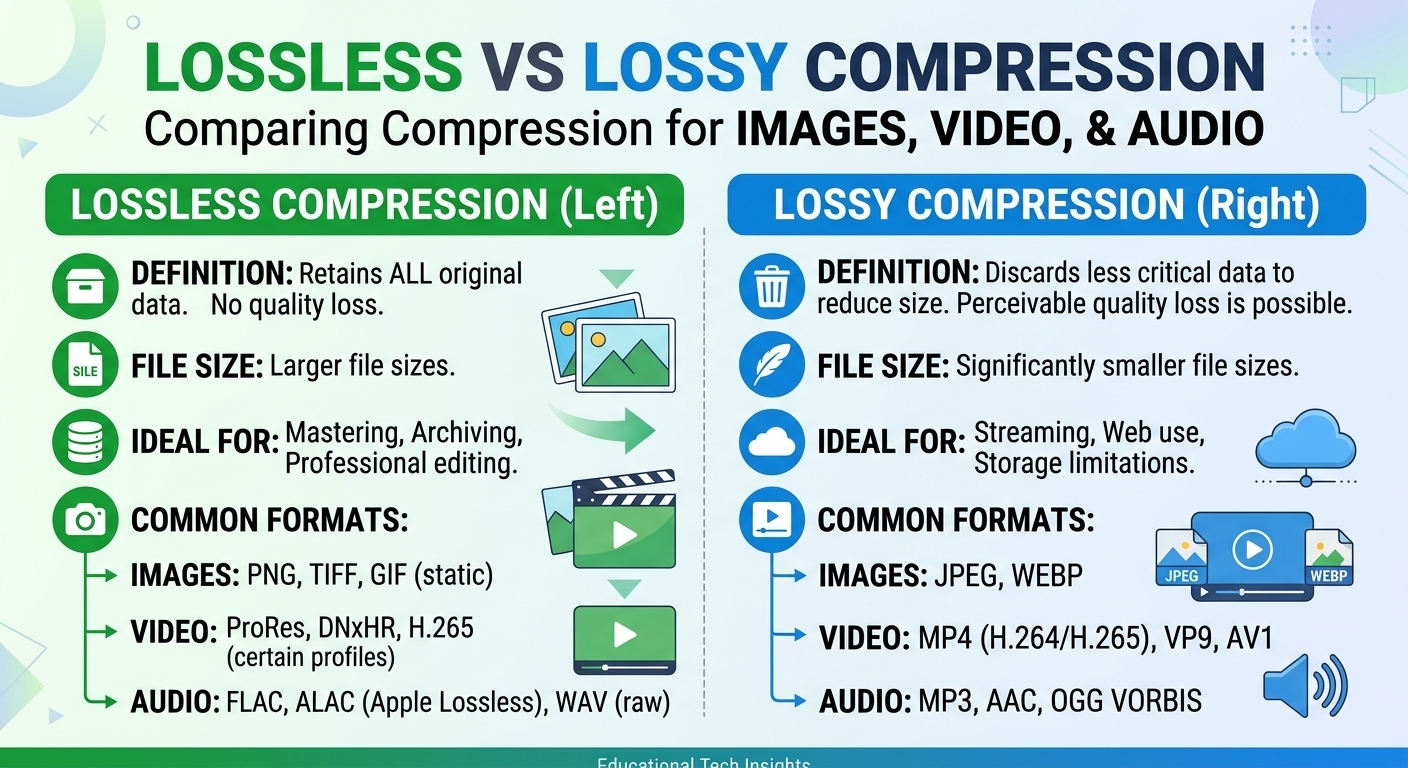
Lossy vs lossless compression comes down to one trade: lossless compression rebuilds every original bit and typically ...
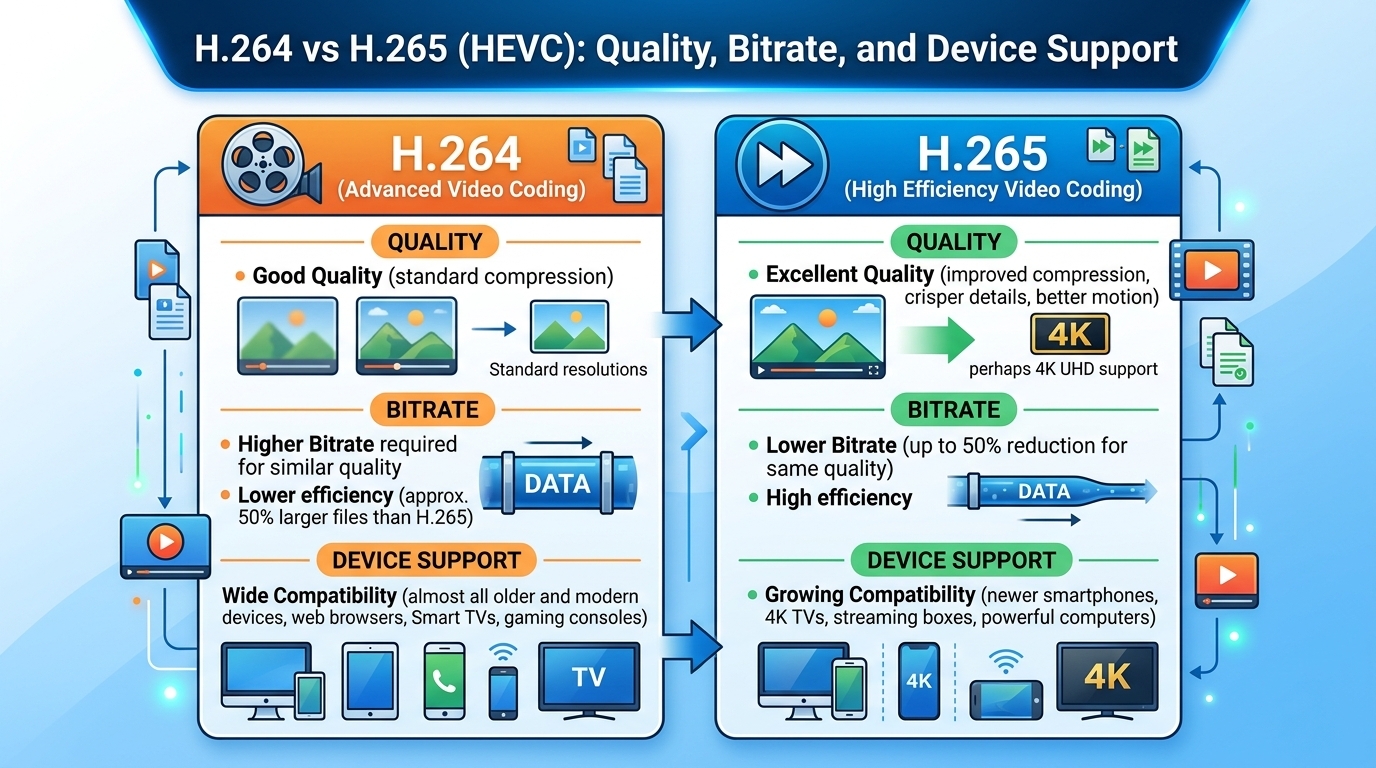
Evaluated October 2026: in the h264 vs h265 decision, HEVC (H.265) matches H.264 (AVC) quality at roughly 30 to 50 percent lower bitrate, with the largest savings at 4K and HDR. H.264 is still the only codec that every browser, phone, set-top box and smart TV decodes. Stream HEVC for 1080p and above, HDR and living-room devices. Keep an H.264 ladder as the universal fallback, and drop it only when your player telemetry shows the HEVC-capable share is close to 100 percent.
As of 2026, H.265 (HEVC) encoders deliver H.264-equivalent quality at about 30 to 50 percent less bitrate, with gains near 50 percent at 2160p and closer to 20 to 30 percent below 720p. Hardware HEVC decoding has shipped in Apple devices since 2015 and in virtually every 4K TV. Chrome has supported it since version 107 (2022) wherever the GPU provides a hardware decoder.
The less obvious part is the economics. A second codec ladder means more encoding compute, more storage and a split cache footprint. Whether HEVC pays for itself depends far more on your per-TB delivery rate and your catalog-to-traffic ratio than on the codec itself.
HEVC gets its efficiency from structural changes rather than tuning:
Large flat areas and slow motion benefit most. That is why the gain grows with resolution: a 4K frame has more of the redundancy that big blocks exploit.
In practice, typical figures for well-tuned software encoders look like this. A 1080p rendition that needs 5 to 6 Mb/s in H.264 lands around 3 to 4 Mb/s in HEVC. A 2160p rendition that needs 25 to 40 Mb/s in H.264 lands around 12 to 20 Mb/s in HEVC. These are labeled ranges, not guarantees: content complexity moves them by tens of percent.
Hardware encoders (GPU and ASIC) narrow the HEVC advantage, because they skip the expensive rate-distortion searches where much of the gain lives. For VOD, a useful starting point comes from the libx265 wrapper documentation: its default CRF of 28 is meant to look roughly like libx264 at CRF 23. Treat that as a calibration point only. Confirm every rung with VMAF or a comparable perceptual metric on your own titles before you trust a percentage.
| Criterion | H.264 (AVC) | H.265 (HEVC) |
|---|---|---|
| Bitrate at equal quality | Baseline | About 30 to 50 percent lower, largest at 4K |
| Typical 1080p bitrate | 5 to 6 Mb/s | 3 to 4 Mb/s |
| HDR10 and 10-bit | High 10 profile exists but is rarely hardware-decoded | Main10 is the de facto HDR10 and Dolby Vision base |
| Software encode cost | Baseline | Roughly 3 to 10 times more CPU at comparable presets (estimate) |
| Browser playback | Universal | Safari yes; Chrome and Edge with a hardware decoder; Firefox inconsistent |
| TVs and mobile | Universal | All 4K TVs, Apple A9 and later, most Android devices since about 2015 |
| HLS packaging | MPEG-TS or fMP4 | fMP4 (CMAF) with the hvc1 sample entry for Apple players |
| Licensing | One dominant pool; internet video free to viewers carries no royalty | Several pools plus independent licensors |
HEVC wins every efficiency row and loses only on reach, encode cost and licensing clarity, which is why the dual-ladder setup remains the default in 2026.
H.265 streaming works natively on Apple platforms, smart TVs, streaming sticks and most Android phones. On desktop browsers it depends on a hardware decoder: Chrome and Edge play HEVC only when the GPU exposes one, and Firefox support varies by operating system. Any web audience therefore needs a runtime capability check and an H.264 fallback.
The hardware milestones that define your reachable base:
On the web, do not infer support from the user agent. Query MediaSource.isTypeSupported with the exact CODECS string, for example hvc1.2.4.L123.B0 for Main10 at level 4.1. Then call MediaCapabilities.decodingInfo and check the powerEfficient flag. A device that only decodes HEVC in software will drain the battery and drop frames, so treat it as H.264-only.
In HLS, list both codecs in the multivariant playlist with accurate CODECS attributes and let the player choose. In DASH, put each codec in its own adaptation set.
H.264 has one dominant patent pool, and that pool has permanently waived royalties for internet video delivered free to end users. HEVC licensing is fragmented across several pools, including Access Advance and Via LA, plus licensors outside any pool.
Streamed content has generally not been the expensive part. The device and software side has. Shipping a software HEVC decoder exposes a browser or OS vendor to multiple royalty claims. That is why Chrome and Firefox lean on hardware decoders the chip vendor already licensed, and why Windows sells HEVC playback as a separate extension.
For a streaming service, the practical exposure is usually limited to encoders you distribute and apps that bundle their own decoder. Review that with counsel rather than assuming either codec is royalty-free in every context.
This blog's worked example uses five assumptions:
Egress drops by 200 x 0.70 x 0.35 = 49 TB, to 151 TB a month. The new HEVC ladder adds about 4.4 GB per catalog hour (6.75 GB x 0.65), or roughly 44 TB stored. That storage costs about $660 to $1,010 a month, plus a one-time encode bill that grows with every new title.
At hyperscaler list rates of roughly $20 to $85 per TB (estimate), the 49 TB saved is worth $980 to $4,165 a month. HEVC pays back quickly.
At low metered rates, the math flips. As of October 2026, BlazingCDN charges from $5 per TB down to $2.50 per TB at volume on progressive tiers, so 200 TB costs $765 and 151 TB costs $593.50 (the first 100 TB for $415, plus 51 TB at $3.50). Current rates are on the BlazingCDN pricing page, and you can model your own ladder with the CDN cost calculator for HEVC and H.264 egress. That $171.50 monthly saving does not cover the second ladder's storage.
The break-even rule this example produces is simple: HEVC pays on egress when TB saved per month multiplied by your per-TB delivery rate exceeds the extra TB stored multiplied by your storage rate, plus amortized encoding. Large catalogs with long tails and cheap delivery fail that test. Small catalogs with heavy traffic and expensive delivery pass it easily.
This blog's contrarian take: on cheap delivery, the strongest case for HEVC is not the bill. It is quality of experience. At the same 4 Mb/s, an HEVC viewer gets the 1080p rung instead of 720p, and HDR effectively requires HEVC.
BlazingCDN delivers pre-encoded HLS, LL-HLS and DASH and does not transcode. Your pipeline produces both ladders, and the CDN serves them as ordinary segments.
| Workload | Best fit | Why |
|---|---|---|
| 4K and HDR VOD for TV apps | HEVC only | Universal decode on 4K devices; HDR10 requires Main10 |
| Premium 1080p VOD, mixed devices | HEVC plus H.264 fallback | Better rung per Mb/s where supported, reach everywhere else |
| Native iOS and Android apps | HEVC first | Hardware decode on nearly all active devices; keep H.264 for old Android |
| Browser-first audience, long-tail or UGC catalog | H.264 | Storage and encode cost of a second ladder beat the egress saving |
| Low-latency live sports | H.264, HEVC for TV endpoints | Real-time encode budget and decoder startup favor AVC |
| E-learning and corporate video | H.264 | Low-motion content gains least; managed desktops vary in HEVC support |
HEVC is the right primary codec wherever the audience sits on TVs and native apps, while H.264 still wins for browser-heavy, long-tail and low-latency workloads.
AV1 is the next comparison for web-heavy audiences and deserves its own evaluation rather than a footnote here.
HEVC looks better at the same bitrate, typically matching H.264 quality with 30 to 50 percent fewer bits. The advantage is largest at 4K and in flat, slow-moving scenes, and smallest below 720p or with hardware encoders. Verify on your own content with VMAF at each ladder rung, because encoder settings and content complexity can shift the gain by tens of percent.
Safari plays H.265 natively on Apple devices with A9 or later chips. Chrome has supported HEVC since version 107 in 2022, but only where the GPU provides a hardware decoder, and Edge behaves similarly. Firefox support varies by operating system. Web players should check MediaSource.isTypeSupported and MediaCapabilities.decodingInfo before selecting HEVC renditions.
Streaming H.265 content has generally not triggered royalty demands, but HEVC licensing is split across several patent pools and independent licensors. Exposure usually comes from distributing encoders or apps that bundle their own software decoder. H.264 is simpler, because its main pool waives royalties for internet video delivered free to viewers. Confirm your situation with counsel.
Most low-latency live streams still use H.264, because real-time software HEVC encoding needs several times the CPU per channel. Hardware HEVC encoders make live HEVC practical, though with smaller savings, often 20 to 30 percent (estimate). A common pattern is H.264 for browsers and mobile web, plus an HEVC ladder for TV and native app endpoints.
Switching to HEVC reduces delivered terabytes in proportion to the HEVC-capable share of viewing and the bitrate saving, often 20 to 35 percent of total egress. Net savings depend on your per-TB rate. Expensive delivery pays back quickly, while cheap metered delivery may not cover the storage and encoding cost of maintaining a second rendition ladder.
This week, encode your 20 most-watched titles in HEVC and match VMAF to your current H.264 rungs. Then sum segment bytes per rung to get your real saving. From player telemetry, pull the share of watch time on devices where decodingInfo reports powerEfficient HEVC.
Multiply three numbers: that share, the measured saving and your monthly terabytes. Compare the result, priced at your delivery rate, against the storage cost of the extra ladder. The answer tells you whether HEVC is a cost project or a quality project.
If you run the test with both ladders, the BlazingCDN HLS Streaming CDN delivers pre-encoded HLS, LL-HLS and DASH renditions of either codec during a 14-day testing period on real production traffic at $5 per TB, with the monthly minimum waived.

Heavy traffic.
Light bill.
The CDN for video and large traffic
Learn
Lossy vs lossless compression comes down to one trade: lossless compression rebuilds every original bit and typically ...
Pricing - Pricing & Costs
The CloudFront vs S3 decision depends more on object size than on traffic volume. At a 500 KB average response, 100 TB ...
Learn
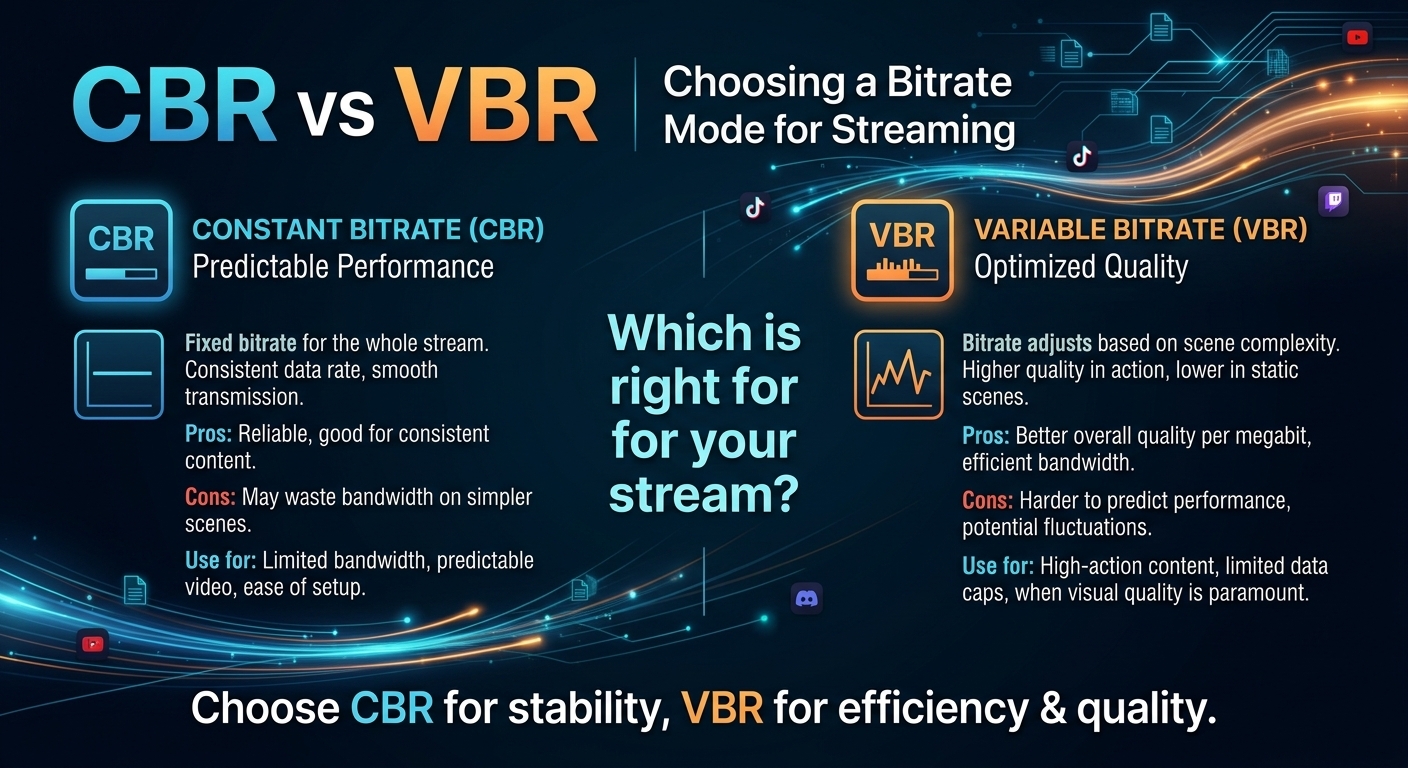
For most on-demand video, capped variable bitrate (VBR) wins the cbr vs vbr decision: it spends bits where the picture ...