Best CDN for Image-Heavy Websites: Optimizing Image Delivery Globally
The Hidden Cost of Heavy Images: How the Right CDN Transforms Global Performance
According to the HTTP Archive, images account for over 45–50% of the average web page weight on desktop and mobile. On slower networks, that single fact can decide whether users stay, buy, or bounce. If your website is image-heavy—ecommerce catalogs, media galleries, travel platforms, real estate listings—your images are almost certainly the bottleneck.
At the same time, Google’s own research has shown that as page load time increases from 1 to 3 seconds, the probability of a user bouncing jumps by 32%, and it only gets worse from there. In other words: every unoptimized hero banner, product zoom, or carousel slide is eroding your revenue and SEO visibility, especially for visitors far from your origin server.
This is where choosing the best CDN for image-heavy websites becomes less about buzzwords and more about survival. A generic CDN can cache files; an image-focused CDN strategy can reshape bytes, formats, and delivery paths to radically optimize image delivery globally.
In the next sections, we’ll move from the physics of distance and latency to concrete configuration patterns, real-world behaviors of global audiences, and how to align your CDN stack to your image-heavy workload. As you read, keep asking: “What would this look like on my site, with my images, for my slowest users?”
First, let’s understand why image-heavy websites suffer disproportionately—and why it hits your global users the hardest.

Why Image-Heavy Websites Struggle Globally
An image-heavy page looks simple on the surface: grids of photos, product shots, lifestyle scenes, thumbnails. Underneath, it’s often dozens or hundreds of separate HTTP requests and megabytes of data that must cross oceans in milliseconds.
The Physics of Distance and Latency
When a user in Singapore opens an image-rich page hosted on an origin in Frankfurt, every uncached image must make the full trip: DNS resolution, TLS handshakes, HTTP requests, and multi-megabyte responses. On fiber, this might be tolerable; on constrained 4G, it’s a recipe for timeouts and frustrated users.
- Latency: Even at the speed of light, round-trip times across continents add hundreds of milliseconds.
- Packet loss: On mobile networks, retransmissions amplify delays when images are large.
- Concurrency limits: Browsers limit concurrent connections; a page with 100 images quickly hits practical ceilings.
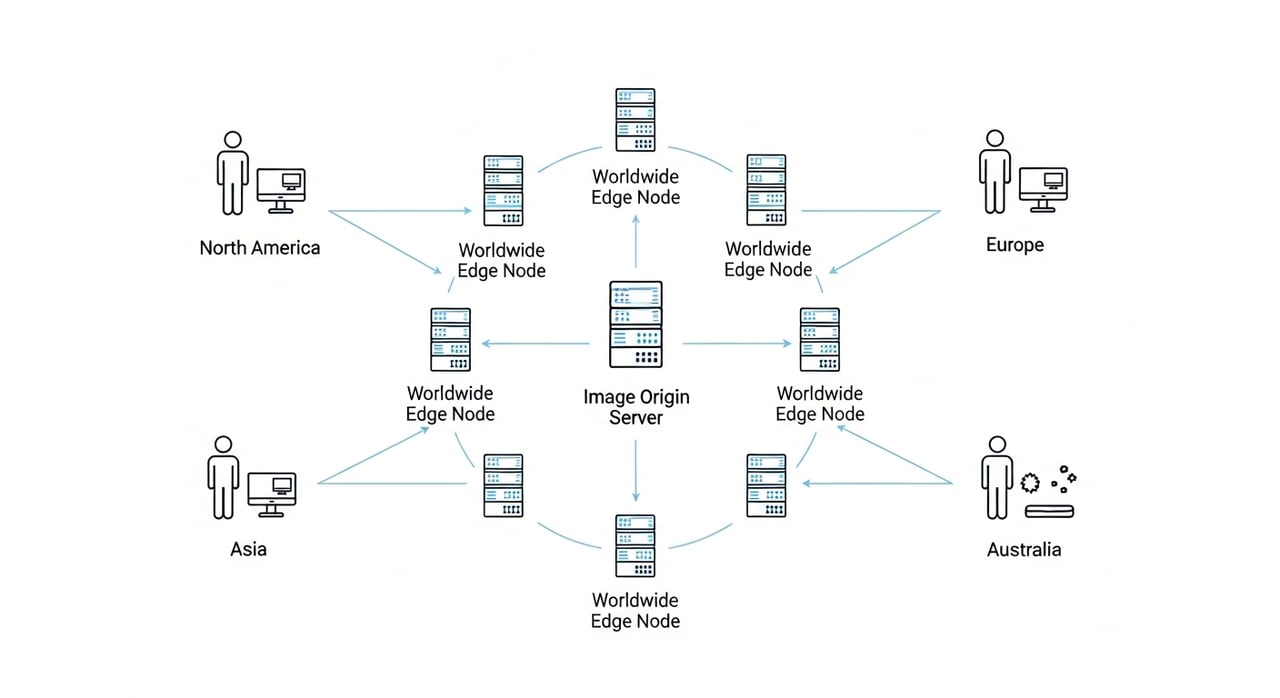
CDNs mitigate distance by caching content closer to users, but not all CDNs are equally effective for images. Without correct caching rules, compression, and format negotiation, you’re just replicating the same inefficiencies worldwide.
As you think about your own stack, ask: are your slowest users far from your origin, on mobile, and trying to load your heaviest pages?
What “Image-Heavy” Really Means in Practice
“Image-heavy” isn’t just a design choice; it describes a specific performance and infrastructure profile. Consider:
- Ecommerce: Dozens of product thumbnails per category page, multiple angles per product, zoomable hi-res shots.
- Media & news: Hero images on every article, embedded galleries, inline illustrations.
- Travel & real estate: Full-screen location shots, floor plans, maps, 360° tours.
- Marketplaces: User-generated photos in listings, reviews, and community feeds.
Sites in these categories often ship 3–10 MB of image data per page unless carefully optimized. That’s fine on a wired connection in a major city; it’s brutal on a mid-range phone on a congested network in another region.
Many global brands have learned this the hard way: international users see slower page loads, lower conversion rates, and weaker engagement metrics, even though the design and content are identical worldwide.
So, if images are such a huge part of your payload, what should a CDN actually do beyond “just caching” them?
What Makes a CDN Ideal for Image Delivery (Not Just “Any” CDN)
The best CDN for image-heavy websites isn’t defined only by raw network capacity. It’s defined by how intelligently it handles many variations of the same core asset: different devices, countries, formats, and cache lifetimes.
Think of your CDN as an image logistics system. The origin stores the master file; the CDN needs to deliver the right variant to the right user at the right time—with minimal waste.
Advanced Caching Rules for Images
Most CDNs default to simple caching: respect origin headers and cache files by URL. Image-heavy websites need more nuance.
- Long-lived cache for static images: Product images or article thumbnails rarely change; set long
Cache-Controlmax-age and aggressive CDN caching. - Versioned URLs for updates: Instead of purging often, use filename or query-string versioning (e.g.,
image.v2.jpg) so caches can stay warm. - Separate policies for user-generated content: UGC may change more frequently, expire faster, or need more rigorous validation.
An image-optimized CDN configuration lets you tune TTLs (time-to-live) and cache keys precisely for different image classes, reducing origin load and improving global hit ratios.
When was the last time you reviewed your image caching rules—and do they still reflect how your content really changes?
Reliability, Failover, and Origin Protection
Image-heavy websites are prone to traffic spikes: flash sales, viral content, big news days. A CDN that behaves like a thin layer can collapse under that pressure, sending thundering herds straight to your origin.
The right CDN for image delivery should provide:
- Consistent, global uptime: A track record of 100% availability for content delivery even during regional incidents.
- Origin shielding-style behavior: Configuration options that funnel cache misses through a protective layer to prevent overwhelming your infrastructure.
- Graceful degradation: Options like serving slightly stale content when the origin is unstable, rather than failing requests outright.
Enterprises often compare everything to Amazon CloudFront in terms of reliability. That’s a reasonable benchmark—but you don’t necessarily have to pay hyperscaler prices to achieve similar stability for images.
If an unexpected spike doubled your global image traffic tonight, would your current CDN absorb it, or would your origin suffer?
Modern Protocols and Connection Optimization
For images, bytes matter—but so do connections. A modern CDN should support and tune:
- HTTP/2 and HTTP/3: Multiplexing many image requests over fewer connections improves page load times, especially on high-latency links.
- TLS optimization: Session resumption and efficient ciphers save precious milliseconds per connection.
- Compression of non-image assets: While images aren’t typically gzip’d, optimizing CSS/JS around them reduces overall payload and speeds rendering.
Combined with smart caching, these protocol-level optimizations help your image-heavy pages feel snappy even when total bytes are high.
Is your CDN actually serving traffic over HTTP/3 where it matters most—on mobile, in emerging markets, during peak hours?
Image Optimization Fundamentals: Formats, Sizes, and Variants
Before you can optimize image delivery globally, you need to reduce the cost of each image. A CDN doesn’t magically fix 5 MB hero images—but the right stack and configuration can automate and enforce best practices at the edge.
Choosing the Right Image Formats
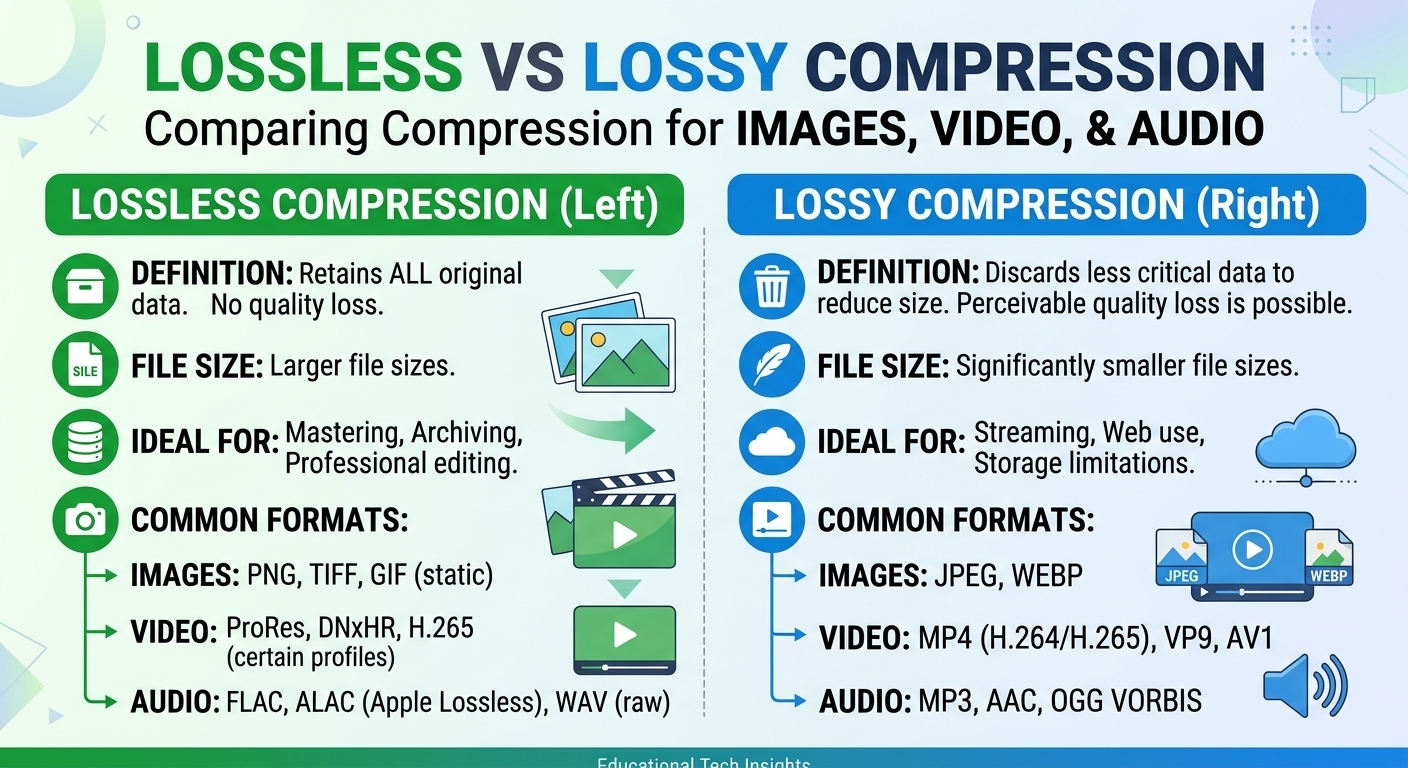
Legacy formats like JPEG and PNG still dominate, but modern formats provide major savings:
- JPEG: Good baseline for photographs; quality/size tradeoff easy to tune.
- PNG: Best for graphics with sharp edges or transparency, but often very heavy.
- WebP: Typically 25–35% smaller than JPEG for similar visual quality, with support in all major browsers.
- AVIF: Can be 40–60% smaller than JPEG at comparable quality, though encoding is slower and support is still maturing.
An image-first CDN strategy often involves storing a high-quality master (e.g., lossless or high-quality JPEG/PNG) and dynamically converting to WebP or AVIF at the edge based on browser support.
Practical tip: Start by ensuring WebP delivery to supported browsers; AVIF can be a second step once your pipeline is stable.
If you inspected your image responses right now, how many bytes could you save by switching to WebP or AVIF for supported clients?
Responsive Images and Device-Aware Delivery
One of the biggest hidden costs on image-heavy sites is overserving: sending desktop-sized images to mobile devices. This wastes bandwidth, slows rendering, and hurts Core Web Vitals.
Responsive strategies include:
- Srcset and sizes: Define multiple resolutions per image and let the browser pick the right one.
- Device-aware edge logic: Use user-agent inspection or Client Hints (e.g.,
Viewport-Width) to select appropriate variants. - DPR-based variants: Serve higher-resolution images to high-density screens without overserving to low-density ones.
A CDN with image transformation capability can generate these variants on-the-fly, caching each variant independently so popular sizes are served instantly without recomputing.
How many of your users are downloading 2x or 3x more pixels than their screens can display because you’re serving “one-size-fits-all” images?
Compression, Quality, and Perceptual Tuning
The last 20–30% of optimization comes from careful compression settings. The goal isn’t to minimize bytes at any cost—it’s to minimize bytes without users noticing.
- Quality presets: Experiment with JPEG/WebP quality values (e.g., 75 vs. 85) and test visually on key images.
- Perceptual metrics: Use SSIM or PSNR-based comparisons when fine-tuning compression pipelines.
- Domain-specific profiles: Product images may tolerate different compression than detailed infographics or UI screenshots.
CDNs that support real-time transformations can apply different presets by path pattern—lighter compression for hero banners, stronger for thumbnails—without forcing you to maintain multiple copies at the origin.
Have you defined compression standards for different image types, or is every asset treated identically regardless of context?
Image CDN vs. Generic CDN: What’s the Difference?
Not all CDNs are equally capable when it comes to images. A traditional CDN focuses on caching and delivery; an image-focused CDN strategy layers in transformation, optimization, and variant management.
| Capability | Generic CDN | Image-Optimized CDN Strategy |
|---|---|---|
| Caching | Basic URL-based caching, limited control per asset type. | Granular TTLs, cache keys by device, format, or quality profile. |
| Formats | Serves whatever format the origin provides. | Edge-based conversion to WebP/AVIF based on browser support. |
| Responsive Delivery | Relies entirely on origin-generated variants. | Dynamically generates and caches multiple sizes per image. |
| Origin Load | High during spikes or cache misses. | Reduced via long-lived caching, shielding, and variant reuse. |
| Developer Workflow | Manual asset prep, more DevOps overhead. | Automated optimization at the edge, simpler pipelines. |
Enterprises that rely heavily on visual content—media publishers, fashion ecommerce brands, travel aggregators—see disproportionate benefits from an image-aware CDN design. Even without rewriting the entire stack, putting transformation and smart caching at the edge can produce double-digit reductions in page weight and time-to-interactive.
Is your CDN simply copying your problems closer to users—or actively fixing them as part of delivery?
How to Evaluate the Best CDN for Image-Heavy Websites
Choosing the best CDN for image-heavy websites requires zooming out from a pure “price per GB” comparison and looking at how the platform aligns with your image strategy, stack, and growth plans.
1. Performance Where Your Users Actually Are
Start with your analytics. Where do your image requests originate—geographically, by device, by connection type?
- Latency and throughput tests: Use synthetic testing and RUM (real user monitoring) to measure image load times from key regions.
- Core Web Vitals for image pages: Focus on LCP (Largest Contentful Paint), CLS (Cumulative Layout Shift), and INP (Interaction to Next Paint).
- Consistency under load: Evaluate performance during sales, launches, or seasonal peaks.
Look for CDNs that perform consistently well in your highest-value regions, not just in benchmark charts.
Do you know which country, device type, or network segment currently suffers the worst image performance on your site?
2. Reliability and Enterprise-Grade Stability
For enterprises, image delivery is often mission-critical. Outages or degraded performance don’t just hurt UX; they interrupt revenue streams, marketing campaigns, and partner integrations.
Key questions to ask potential providers:
- What is your documented uptime for content delivery? (Aim for 100% or as close as practically possible.)
- How do you handle regional incidents or routing anomalies to keep images available globally?
- How straightforward is it to roll back configurations if something goes wrong?
Many enterprises are used to the robustness of Amazon CloudFront and assume similar uptime comes with hyperscaler-level costs. Modern CDNs like BlazingCDN show that it’s possible to achieve stability and fault tolerance on par with CloudFront while remaining far more cost-efficient for sustained large-scale image delivery.
If your primary CDN had a regional issue right now, how quickly—and transparently—could you adapt without breaking image delivery?
3. Cost Structure Aligned with Image Workloads
Image-heavy traffic can be very expensive if priced poorly. You need clarity on:
- Per-GB transfer costs by region: Important when serving high volumes of hi-res media globally.
- Transformation or “worker” charges: Are image format conversions or resizing billed separately?
- Commit discounts: Can you negotiate rates once usage passes certain thresholds?
A provider like BlazingCDN is particularly attractive for this profile, with a starting cost of just $4 per TB ($0.004 per GB). For enterprises pushing tens or hundreds of terabytes of images monthly, that difference versus many legacy CDNs quickly becomes seven-figure annual savings—without sacrificing performance.
Do you have full visibility into how much your current CDN bills are driven specifically by images—and what a 20–30% reduction in image bytes would save?
4. Flexibility, Configuration, and Developer Experience
Optimizing images globally is an ongoing process; your CDN must be easy to work with.
- Config as code: Can you version and test CDN configs alongside application code?
- Granular rules: Can you apply different policies to different paths (e.g.,
/media/products/vs/media/user/)? - Preview and staging: Can you validate image transformations in a safe environment before global rollout?
When your CDN makes it simple to experiment—e.g., with different WebP compression levels or responsive strategies—you unlock compounding gains over time.
How long would it take your team today to ship a new global image optimization rule and roll it back if metrics dip?
Where BlazingCDN Fits for Image-Heavy Enterprises
BlazingCDN was built with high-throughput, media-rich workloads in mind, making it a strong fit for enterprises whose business models depend on fast, reliable image delivery: ecommerce platforms, news and media organizations, travel and hospitality brands, gaming ecosystems, and SaaS products with visually rich dashboards.
From an infrastructure perspective, BlazingCDN offers 100% uptime for content delivery and delivers stability and fault tolerance comparable to Amazon CloudFront, yet remains substantially more cost-effective. With transparent pricing starting at $4 per TB ($0.004 per GB), large enterprises can cut CDN spend on image traffic without compromising consistency or coverage.
For teams evaluating advanced capabilities—fine-grained caching rules, easy integration with build pipelines, and robust transformation options—its feature set is designed to support rapid scaling and experimentation. For a deeper overview of what’s available, you can explore the BlazingCDN features and map them directly to your current and planned image workloads.
As you benchmark CDNs for your image stack, how much value would you unlock by combining CloudFront-level reliability with significantly lower per-GB costs?
Step-by-Step: Designing an Image CDN Strategy
Now that we’ve covered the concepts, let’s translate them into a practical roadmap. This is where you move from theory to a concrete plan for optimizing image delivery globally.
Step 1: Audit Your Current Image Footprint
Start with visibility. Without a clear picture of your current state, any optimization effort is guesswork.
- Use browser dev tools and synthetic tests to capture total image weight per key page type.
- Segment by device: desktop vs. mobile, and estimate payloads over 3G/4G conditions.
- Identify the heaviest individual assets and patterns (e.g., hero banners, user galleries).
Tools like the HTTP Archive and WebPageTest can provide additional macro-level insights into how your site compares to category peers.
Do you know your top 20 most expensive image URLs by total monthly transfer—and whether they’re fully optimized?
Step 2: Standardize Image Formats and Quality
Next, define standards that apply across your product, editorial, and marketing teams:
- Decide where WebP is mandatory, and where AVIF may be introduced.
- Set default quality levels per asset type (e.g., 80 for product shots, 70 for background imagery).
- Agree on minimum dimensions and aspect ratios for uploads to avoid wasted pixels.
These standards become your baseline; the CDN then enforces and optimizes them at scale.
Could your designers, marketers, and engineers all describe your “standard” image profile in the same way today?
Step 3: Map CDN Configuration to Your Image Taxonomy
Your site likely already has a loose taxonomy—for example:
/media/products/– Catalog images/media/editorial/– Article visuals/media/user/– User-generated content/media/system/– Logos, UI icons, global assets
Use these paths to drive CDN rules:
- Long TTLs and aggressive caching for stable assets (logos, evergreen product photos).
- Moderate TTLs with revalidation for UGC that may be edited or removed.
- Different compression or format strategies based on visual importance.
The more clearly your image taxonomy maps to URLs, the more precise and powerful your CDN configuration can be.
If you had to apply stricter compression to only 10% of your images tomorrow, could you target them cleanly by URL pattern?
Step 4: Introduce Responsive and Format-Aware Delivery
With taxonomy and standards in place, you can introduce responsive and format-aware delivery through your CDN:
- Implement
srcsetandsizesin templates for key image components. - Configure the CDN to serve WebP or AVIF to compatible browsers while falling back gracefully.
- Cache each variant (by resolution and format) independently to maximize hit ratios.
For enterprises re-platforming or modernizing front-ends, this is often tied to a design system refresh or component library update, making it easier to roll out consistently across thousands of pages.
Do your UI components “know” about image performance—or are they still designed as if every user were on a fast desktop connection?
Step 5: Validate with Performance and UX Metrics
Optimization is only successful if it measurably improves user experience and business outcomes. After rolling out CDN changes:
- Track Core Web Vitals specifically on image-heavy templates.
- Monitor conversion and engagement metrics by traffic segment (device, region, new vs. returning).
- Watch for regressions in visual quality—especially on critical flows like product detail pages.
You may find that slightly higher compression yields no noticeable UX impact but major performance wins—or vice versa for your most premium content.
Can you tie improvements in LCP on image-heavy pages directly to changes in add-to-cart rates, signups, or content consumption?
Ongoing Optimization: Treat Images as a Living System
Optimizing image delivery globally is not a one-time project; it’s a continuous process that evolves with devices, networks, and user expectations. What works well today may be suboptimal in 18 months as browser support and codecs evolve.
Monitor, Analyze, Iterate
To keep your image strategy sharp:
- Implement RUM for images: Track how long key image resources take to load in the real world, across geos and devices.
- Analyze CDN logs: Look for cache misses, unusual spikes, or heavy tail distributions of asset sizes.
- Periodically benchmark: Compare your site’s image performance to peers with tools and public reports.
Leading organizations bake these checks into quarterly performance reviews or release cycles, ensuring image performance never drifts too far from target.
When was the last time you revisited your image delivery assumptions end-to-end—from upload to edge to user device?
Use Experiments to De-Risk Bold Changes
Worried about switching a large portion of traffic to AVIF, or cutting image quality by 10 points? Use A/B testing:
- Route a small percentage of traffic through a new CDN config variant.
- Measure performance, error rates, and key business KPIs.
- Roll out globally only when you’re confident in the outcome.
A CDN platform that supports segmented configuration or easy rule scoping makes these experiments significantly safer and faster.
Could you confidently run an experiment that changes image formats or compression for 10% of global traffic next week?
Bringing It All Together: Turn Images into a Competitive Advantage
For image-heavy websites, performance is not a nice-to-have. It’s the difference between abandoned carts and completed purchases, between skimmed headlines and deeply engaged readers, between casual browsing and loyal communities. The right CDN choice—and the right configuration—can turn images from a liability into a competitive moat.
BlazingCDN is already being adopted by forward-thinking enterprises that care about both reliability and efficiency, precisely because it balances CloudFront-level stability with dramatically lower transfer costs, flexible configuration, and a roadmap that aligns with modern, image-rich digital products. For media companies and streaming platforms especially, solutions like BlazingCDN for media organizations help reduce infrastructure spend while scaling to meet huge spikes in demand without compromising visual quality or user experience.
If your site lives or dies by how quickly and beautifully images load around the world, now is the time to re-evaluate your approach: audit your image footprint, benchmark your current CDN, and design an image-first delivery strategy that treats performance as a core product feature. Then, put providers like BlazingCDN head-to-head against your current stack, not just on paper but in live, data-driven tests.
Your next move? Start by picking one of your most image-heavy templates—maybe a product listing page, a gallery, or a popular article—and ask: “What would it take to cut image load time in half for my slowest users?” Share this article with your performance, product, and infrastructure teams, start that conversation today, and turn your CDN into a strategic lever instead of a background utility.