<p><img src="https://matomo.blazingcdn.com/matomo.php?idsite=1&amp;rec=1" style="border:0;" alt="">
Skip to content

Best CDN for E-Learning Platforms: Delivering Courses Without Buffering

In large-scale studies of online video, researchers found that just a two‑second delay in start time can more than double the abandonment rate — and every additional 1% of playback buffering can cut viewing time by up to 3% (Akamai, “The Impact of Video Quality on User Engagement”). For an e‑learning platform, those seconds don’t just cost ad revenue; they cost completed lessons, passed exams, and satisfied students.

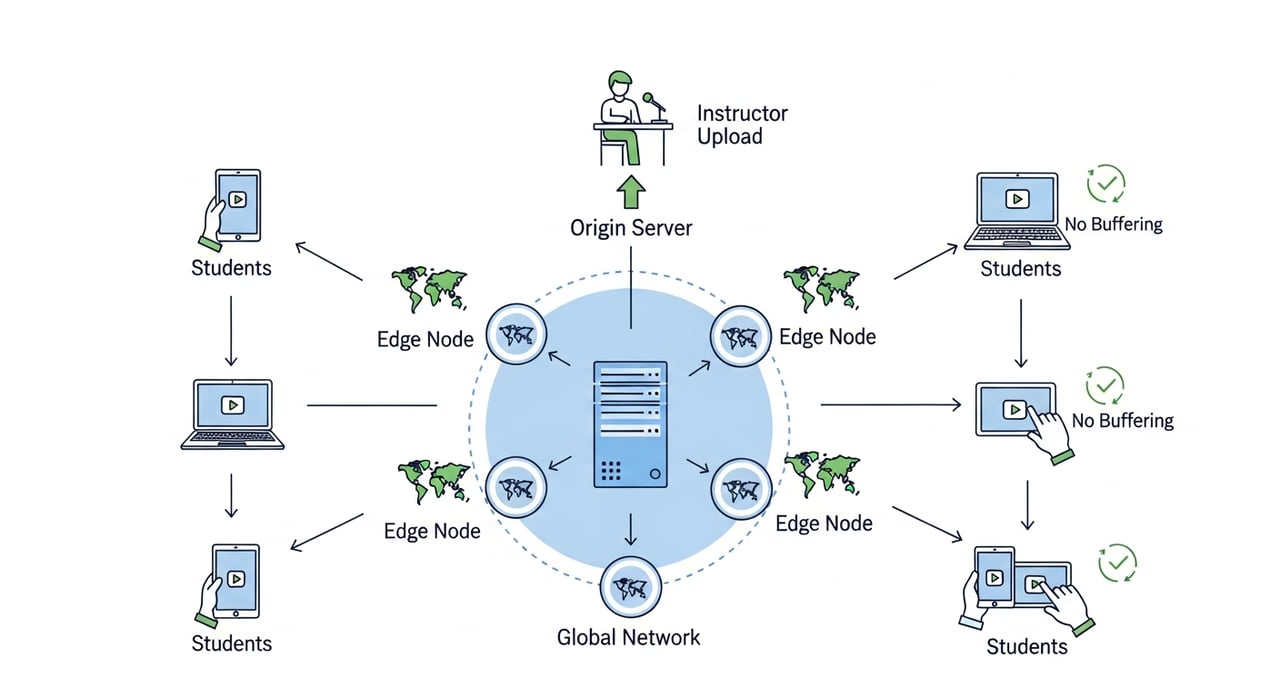
If you’re trying to decide on the best CDN for e‑learning platforms, you’re not just optimizing infrastructure — you’re shaping how much your learners actually absorb. This article will walk through what “no‑buffering learning” really takes: architecture, protocols, vendor choice, and specific configuration patterns used by serious education providers worldwide.

As you read, ask yourself: if a student in your highest‑growth market hit your most popular course right now, from a congested connection, how confident are you that the stream would just play?

Why performance is make‑or‑break for e‑learning adoption

During the first wave of COVID‑19 lockdowns in 2020, over 1.6 billion learners in more than 190 countries were pushed out of classrooms and into digital platforms, according to UNESCO. Traffic to major MOOC platforms like Coursera, Udemy, edX, and regional players in India, Brazil, and Europe surged dramatically — and several national education portals publicly struggled with outages and slowdowns during peak exam periods.

Those failures weren’t caused only by “too many users.” In most cases, the real bottleneck was that their infrastructure — especially content delivery — was never designed for synchronous, peak‑time, video‑heavy learning at national or global scale.

User behavior data from large streaming and web platforms underlines why this matters for education:

  • Google’s analysis of mobile behavior found that as page load time increases from 1s to 3s, the probability of a bounce rises by 32% (Think with Google).
  • Akamai’s research on video quality shows that each second of additional startup delay and each percent of rebuffering both significantly reduce engagement and increase abandonment.
  • In education, low engagement doesn’t just mean lost viewers; it means lower course completion rates and reduced learning outcomes.

Now overlay those stats on a real scenario: a 90‑minute HD lecture with embedded quizzes, plus concurrent live chat and assessments, being accessed from mobile networks across multiple continents. If your CDN and streaming architecture aren’t tuned for this context, buffering is inevitable.

How many of your key metrics — time on lesson, quiz completion, subscription renewals — quietly suffer today because your content delivery isn’t yet built for this reality?

image-2

The unique delivery challenges of e‑learning platforms

Video‑on‑demand platforms like entertainment streamers optimize for binge‑watching in relatively predictable patterns. E‑learning, by contrast, has a different, often harsher workload profile. Before picking the best CDN for e‑learning platforms, it’s worth listing these constraints explicitly.

1. Extreme peak concurrency at predictable but narrow time windows

Exam weeks, live cohort sessions, and assignment deadlines all produce huge spikes in traffic, often in specific regions and at specific hours. When a government‑run learning portal or university LMS announces a nationwide online test slot, hundreds of thousands of students may press “Start” within minutes.

CDN design implication: your CDN must absorb sudden surges in concurrent video segments and API requests without origin overload or cache stampedes. Rate limiting on the origin, intelligent caching, and scalable capacity are non‑negotiable.

When your next enrollment cycle launches, are you confident your current CDN settings can handle a 5–10x surge in sign‑ups, video plays, and downloads — all in the same hour?

2. Long‑form, high‑bitrate content with academic stakes

E‑learning isn’t dominated by short clips. It’s common to see:

  • 45–120 minute lectures in 1080p or higher
  • Screen‑share tutorials and code walkthroughs requiring clear text visibility
  • Recorded labs or simulations where frame drops can break comprehension

CDN design implication: buffering mid‑way is more damaging than in entertainment. Learners may miss key explanations, lose focus, or abandon the course entirely. High throughput and stable bitrate delivery over long sessions matter more than raw “peak” speed.

If a learner hits three buffering events in a 60‑minute lesson, what is the probability they’ll still attempt the next module?

3. Heavy use from bandwidth‑constrained regions and mobile networks

Significant e‑learning growth is coming from regions where 4G — and now 5G — penetration is uneven, and where wired broadband is still limited. Students often learn on mid‑range devices, on congested mobile networks, sometimes sharing connections with family members.

CDN design implication: the “best CDN for e‑learning platforms” is not just the one with the highest benchmarks in North America. It’s the one that consistently delivers adaptive streams that respond gracefully to poor and fluctuating network quality.

Have you ever tested your platform from a real, throttled 3G or congested 4G connection in your fastest‑growing country, or are you still benchmarking from a fiber office line?

4. Mixed content types: video, SCORM, APIs, and real‑time interactions

E‑learning platforms combine:

  • Video assets (HLS/DASH segments, thumbnails, transcripts)
  • Static content (HTML, CSS, JS, fonts) from LMS or custom UIs
  • SCORM/xAPI packages and downloadable resources (PDFs, code, datasets)
  • APIs for user progress, scoring, and recommendations
  • Occasional real‑time components (webinars, chat, whiteboards)

CDN design implication: you need nuanced caching rules and routing for different asset types. Treating API responses the same as video segments, or caching personalized dashboards, can break functionality or cause data leakage.

Does your current CDN configuration have a clear, documented mapping of which paths are cacheable, for how long, and with which headers — or is it still a patchwork of “quick fixes” added over years?

What actually makes a CDN “best” for e‑learning platforms?

Marketing pages all promise “fast, global, reliable.” For education workloads, those words translate into a specific, testable set of capabilities. Use the checklist below to evaluate contenders for the best CDN for e‑learning platforms in your context.

1. First‑mile to last‑mile performance, not just global averages

Global averages hide regional weaknesses. For e‑learning, you should look at:

  • Time to first byte (TTFB) for APIs and HTML in your key student regions
  • Video startup time (time from “Play” to first frame) on typical student devices
  • Rebuffering ratio during long sessions (e.g., percentage of playback time spent buffering)

Leading education platforms often benchmark these metrics country‑by‑country. A CDN that excels in North America but underperforms in South Asia may not be the “best CDN for e‑learning” if your growth is global.

When reviewing vendors, ask: can we see performance broken down by country, device type, and access network, or will we have to infer all of that ourselves?

2. Smart caching for long‑tail courses and cohorts

Education catalogs are often “long‑tail”: tens of thousands of courses with only a fraction trending at any given moment. That makes caching more complex than for a small catalog of popular shows.

Look for:

  • Fine‑grained cache rules based on path, query parameters, or headers
  • Origin shielding or similar features to protect your LMS and media storage from cache misses during peaks
  • Intelligent cache invalidation so updated lessons propagate fast without flushing entire directories

When a professor updates a key lecture the night before a live cohort session, how confident are you that all learners will receive the latest version without you over‑invalidating and causing a rush of origin hits?

3. Protocol support that matches modern learning experiences

Video delivery for e‑learning today usually depends on:

  • HLS (HTTP Live Streaming) and/or MPEG‑DASH for adaptive bitrate streaming
  • HTTP/2 and HTTP/3 (QUIC) for better multiplexing and reduced latency
  • Brotli compression for HTML/JS/CSS to make LMS interfaces feel snappy

The best CDN for e‑learning platforms will support these protocols seamlessly, with minimal configuration overhead and good compatibility across browsers and devices.

Have you mapped which parts of your stack can already benefit from HTTP/3, and which older devices you still need to support with HTTP/1.1 or HTTP/2?

4. Security and privacy aligned with educational data

Education platforms handle sensitive data: student identities, grades, and sometimes payment details. While much of this runs through APIs and authentication services, the CDN still touches cookies, tokens, and personal data if not configured carefully.

When evaluating CDNs:

  • Ensure strong TLS support with modern ciphers and automated certificate management
  • Use cache keys and headers that avoid mixing personalized and public content
  • Follow regional data protection regulations (GDPR, etc.) in how logs and analytics are stored and accessed

Could a misconfigured cache today accidentally serve one student’s personalized content to another — and would your current processes detect that quickly?

5. Transparent, predictable pricing for sustained viewing

E‑learning consumption is often more predictable on a per‑student basis than general entertainment, but it’s heavily affected by enrollment growth and seasonal peaks. Pricing models that penalize spikes or small regional expansions can heavily constrain your roadmap.

When comparing providers:

  • Model costs for high‑engagement students (many hours watched per month)
  • Account for course launches, marketing campaigns, and exam periods
  • Check whether minimum commitments or high overage rates could limit experimentation in new markets

If your traffic doubled next semester because your content finally “clicked” on TikTok or YouTube, would your business case still hold at your current CDN’s pricing?

Architectural building blocks for buffer‑free courses

Once you understand what to look for, the next step is designing your delivery architecture so the CDN can actually help you. A powerful network with poor configuration will still produce a choppy learning experience.

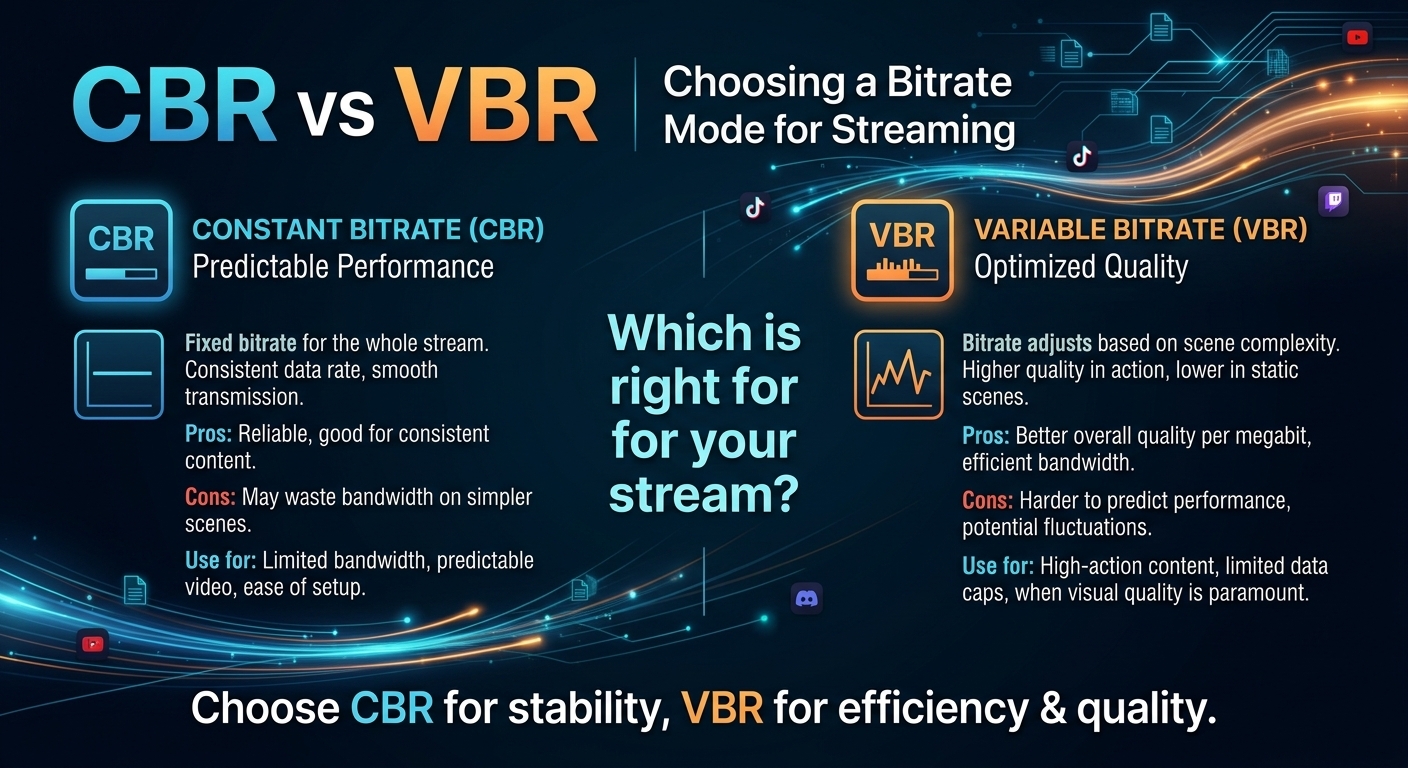
1. Adaptive bitrate streaming tuned for students, not only for cinema

Most modern e‑learning platforms rely on HLS or DASH with multiple bitrate renditions. However, simply copying an entertainment provider’s ladder (e.g., 1080p at high bitrates) may not be optimal.

For education:

  • Prioritize readability of text on slides and code editors over purely cinematic quality
  • Offer lower‑bitrate but still legible renditions (e.g., 480p/720p with tuned encoding) for constrained networks
  • Adjust ABR (adaptive bitrate) algorithms to ramp up quality more conservatively to avoid oscillations and buffering

Have you tested whether your lowest rendition still allows comfortable reading of code and slides on a small smartphone screen, or did you inherit your ladder from a legacy AV workflow?

2. Origin strategy: separate LMS, media storage, and APIs

To prevent one overloaded component from cascading failures across your platform, it’s common to separate:

  • Static/LMS origin: HTML, JS, CSS, images, and fonts
  • Media origin: video segments, audio, captions, thumbnails
  • API origin: authentication, progress tracking, recommendations

Good CDNs allow you to map different hostnames or paths to different origins, with tailored caching rules for each.

Could you point your video delivery to a new media origin or cloud region tomorrow without rewriting your entire application, or is everything still coupled to a single monolithic origin?

3. Cache configuration that respects course lifecycle

E‑learning content has a lifecycle: draft → pilot cohort → full launch → occasional updates → archival. Your cache behavior can reflect this.

  • New or frequently edited courses: shorter cache TTLs, faster invalidations
  • Mature, rarely changed courses: longer TTLs for video segments and assets
  • Archived content: potentially lower priority or different storage class at the origin, but still cacheable for occasional access

Does your current CDN config treat a brand‑new pilot lesson the same as a stable, evergreen course launched years ago, or have you tuned TTLs to your content lifecycle?

4. Client‑side optimizations to complement the CDN

Even the best CDN for e‑learning platforms can’t compensate for heavy, unoptimized front‑ends. Combine CDN work with:

  • Code splitting and lazy loading for dashboards and course pages
  • Preloading of manifest files and first video segments when a learner hovers over or opens a lesson
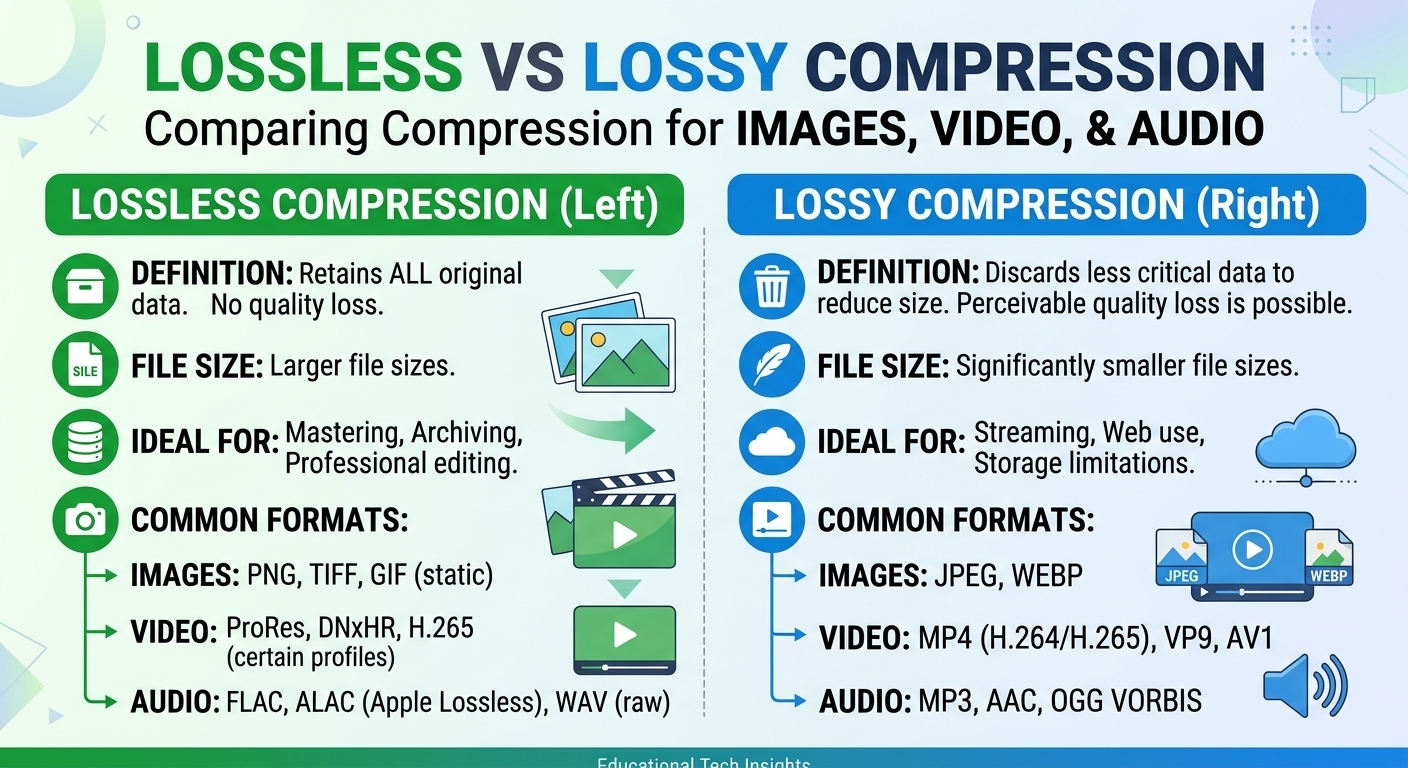
  • Efficient image formats (WebP/AVIF) and responsive images for thumbnails

If your learners already wait 5–7 seconds for the SPA to boot before the first video request even hits the CDN, how much of your performance budget is left for the media itself?

Lessons from how large platforms scaled e‑learning

While individual architectures are proprietary, public talks, engineering blogs, and cloud case studies from major platforms highlight some shared patterns that matter when choosing the best CDN for e‑learning platforms.

Multi‑cloud and multi‑CDN for resilience

Several large education providers use combinations of cloud storage, transcoding pipelines, and one or more commercial CDNs. Some have openly discussed deploying multiple CDNs in front of a unified origin, with smart routing or DNS‑level failover, to ensure consistent availability during regional outages or vendor incidents.

They’re not doing this because a single CDN can’t be fast enough, but because the business impact of downtime — cancelled classes, missed exam windows, reputational damage with institutions — is simply too high.

If your platform suddenly got featured in a national digital‑education program, would your current single‑vendor setup give you the confidence to sign that contract?

“Offline‑first” patterns for bandwidth‑constrained learners

Many MOOC and language‑learning apps offer partial offline support: pre‑downloaded lessons via mobile apps, lightweight quizzes that sync when online, and adaptive content choices. While this is primarily an application design question, the CDN still plays a role in efficiently delivering downloadable assets and delta updates.

Platforms that have invested in this often see better completion rates in markets with unstable connectivity. They treat the CDN as a distribution backbone not only for streaming, but also for periodic bulk downloads.

Do you know what portion of your learners would happily pre‑download a week of lectures overnight if your app made it easy — and is your CDN prepared to handle those nocturnal bursts efficiently?

Tight feedback loops between QoE and product decisions

Leading platforms integrate video QoE analytics into their product and content decisions. For example:

  • Detecting courses with unusually high buffering or abandonment, then re‑encoding or restructuring them
  • Adjusting ABR profiles and default bitrates by region based on observed network conditions
  • Segmenting performance by ISP or geography to guide partnerships and infrastructure investments

The CDN’s analytics and logs often feed into these loops, either directly or via third‑party observability tools.

Right now, can you easily answer: “Which course in our catalog suffers the worst video QoE for learners in our top three countries?”

Comparing leading CDNs for e‑learning workloads

No provider is universally “best”; each has strengths and trade‑offs. The table below focuses on qualities that matter specifically when you’re looking for the best CDN for e‑learning platforms.

CDN Strengths for e‑learning Potential constraints
Amazon CloudFront Deep integration with AWS storage, transcoding, and serverless tools; mature, enterprise‑grade stability suitable for large education deployments. Costs can climb for bandwidth‑heavy global video workloads; advanced configurations may require specialized expertise.
Cloudflare Developer‑friendly tooling, strong DNS, and good performance for static assets and APIs. Media‑specific workflows and detailed video reporting may require additional services or custom setups.
Akamai Long track record with broadcast and media; widely used by large organizations and universities for high‑scale streaming. Enterprise focus can translate into higher pricing and more complex commercial engagement for smaller or mid‑sized platforms.
Fastly Very flexible edge logic and powerful control for engineering‑heavy teams that want fine‑tuned delivery and caching. Requires strong DevOps capability; costs and complexity may be overkill for teams seeking simpler managed setups.
BlazingCDN Modern, cost‑efficient CDN with a focus on video and high‑traffic workloads; stability and fault tolerance comparable to Amazon CloudFront but at significantly lower bandwidth costs. Less “legacy” footprint than decades‑old incumbents, which is an advantage for greenfield e‑learning builds but may require fresh evaluation processes inside large institutions.

Regardless of vendor, the goal is the same: predictable, low‑latency, high‑throughput delivery in your learners’ real‑world conditions, with transparent pricing that scales with your success rather than punishing it.

When you line up vendors, are you comparing like‑for‑like scenarios for your specific regions, bitrates, and peak patterns — or just relying on generic benchmark charts?

Where BlazingCDN fits in the e‑learning ecosystem

For e‑learning providers that need enterprise‑grade stability without enterprise‑only pricing, BlazingCDN sits in an interesting sweet spot. It delivers stability and fault tolerance on par with established leaders like Amazon CloudFront, yet its bandwidth pricing starts at just $4 per TB ($0.004 per GB). For platforms streaming thousands of hours of HD lessons per day, that cost delta often translates directly into the ability to reinvest savings into content, tutors, or market expansion.

BlazingCDN is designed for organizations that value both reliability and efficiency: large universities scaling blended learning, fast‑growing EdTech startups expanding into new geographies, and corporate training providers running continuous, video‑heavy onboarding. With 100% uptime, flexible configuration options, and a roadmap driven by high‑demand digital businesses, it’s already recognized as a forward‑thinking choice for teams that can’t afford buffering during a critical exam or live cohort session. To see how its economics compare for your own traffic profile, you can explore the detailed bandwidth tiers and options on the BlazingCDN pricing page.

As you evaluate candidates for the best CDN for e‑learning platforms in your stack, ask not just “Who is the biggest?” but “Who lets us deliver stable, buffer‑free learning to every enrolled student, at a cost that supports our long‑term mission?”

Implementation blueprint: configuring a CDN for your e‑learning platform

Choosing a vendor is only half the journey. Getting the architecture and configuration right is where you unlock the full value. Below is a practical sequence to follow, whether you’re migrating from another CDN or setting one up for the first time.

Step 1: Inventory and classify all your content

Start by mapping everything that will pass through the CDN:

  • HTML, CSS, JS, fonts (LMS or custom front‑end)
  • Images and thumbnails (instructors, course covers, diagrams)
  • Video and audio (encoded segments, manifests, captions)
  • Documents (PDFs, PPTs, ZIPs, code samples)
  • APIs (login, progress tracking, search, recommendations)

For each category, define:

  • Whether it is cacheable
  • Typical time‑to‑live (TTL) before it changes
  • Any personalization or authentication requirements

Is there a single, up‑to‑date document in your organization that states which URLs should be cached and for how long, or is that knowledge still scattered among developers and legacy tickets?

Step 2: Design hostnames and origins for flexibility

Use separate hostnames (and sometimes subdomains) for distinct traffic types, for example:

  • app.example.edu for the LMS or main web app
  • media.example.edu for video/audio segments and manifests
  • assets.example.edu for images, fonts, and static files
  • api.example.edu for back‑end APIs

Map each to the appropriate origin(s) in the CDN, with dedicated cache settings and origin failover policies where supported.

If you had to move your media origin to a new cloud provider for cost or compliance reasons next quarter, how much DNS and configuration debt would you have to unwind?

Step 3: Optimize video encoding and manifests for your learners

Work with your video pipeline team (or vendor) to produce an encoding ladder that is realistic for your audience:

  • Set multiple resolutions and bitrates (e.g., 240p, 360p, 480p, 720p, 1080p), but tune bitrates to real‑world mobile conditions
  • Consider using modern codecs if your device mix allows it (e.g., H.265/HEVC or AV1 in addition to H.264)
  • Generate accurate manifests (HLS/DASH) and consider short segment durations to reduce perceived startup delay

Integrate player‑side logic that can:

  • Start at a slightly lower bitrate to guarantee fast, buffer‑free startup
  • Ramp up only when conditions are consistently good
  • React quickly to bandwidth drops to avoid long buffering events

Have you A/B‑tested different encoding ladders and ABR strategies by region, or are you still relying on a single global setting inherited from your first implementation?

Step 4: Configure caching rules and headers carefully

Use HTTP headers and CDN rules to establish clear behavior:

  • Public, long‑lived cache for static assets and stable video segments
  • Short‑lived or no‑cache for personalized content and APIs
  • Cache keys that ignore irrelevant query parameters while including those that truly change content (e.g., language switches)

Be especially careful around:

  • Authenticated video URLs (signed URLs or tokens) to avoid caching personalized tokens
  • Exam or quiz content — ensure the right students see the right versions at the right time

If you reviewed your CDN logs today, would you find any API responses or personalized dashboards being cached at the edge in ways that could cause data leakage?

Step 5: Implement synthetic monitoring and real user monitoring (RUM)

Combine two views of performance:

  • Synthetic tests: scripted checks from multiple regions that hit key journeys (login, open course, play lesson)
  • RUM: lightweight metrics built into your player and app that report real startup time, buffering, and errors from actual learners

Correlate this data with CDN logs and analytics to spot:

  • Regions or ISPs with unusually high buffering
  • Courses or content types that underperform
  • Time‑of‑day effects — for example, network congestion during evening study hours

Do you have dashboards today that let your product team see the impact of a new content release or marketing campaign on video QoE within hours, or are you still learning about issues via support tickets days later?

Metrics that define “no‑buffering” for e‑learning

To know whether you’ve truly chosen the best CDN for e‑learning platforms in your context, set explicit targets around a few critical metrics. These don’t need to match Netflix‑level SLAs, but they should be grounded in research and your own data.

1. Time to first frame (TTFF)

Measuring from the moment the learner presses “Play” to the first video frame:

  • Excellent: < 1.5 seconds on typical connections in your primary regions
  • Acceptable: 1.5–3 seconds
  • Risky: > 3 seconds regularly, which correlates with sharp abandonment increases according to streaming studies

What percentage of your lesson starts today meet your “excellent” target in each of your top 5 markets?

2. Rebuffering ratio and event frequency

For long lectures and labs, it’s not just whether buffering happens, but how often and for how long:

  • Rebuffering ratio: total buffering time divided by total viewing time — keep this as low as possible
  • Event frequency: number of buffering events per hour of playback

Streaming research suggests that as rebuffering increases, engagement and completion drop measurably — especially for first‑time viewers who haven’t yet formed a habit.

If you plotted rebuffering events against course completion rates by region, would you find any hidden performance‑driven drop‑off you’ve been attributing to “content quality” alone?

3. Lesson load time (LMS + video)

Measure from clicking a course or lesson to seeing a fully usable page with the player ready:

  • LMS content load: HTML, JS, and CSS delivery via CDN
  • Player readiness: scripts loaded, manifest fetched, first segments primed

In e‑learning, slow lesson pages can inflate perceived video issues — learners don’t distinguish between SPA boot time and stream startup delay; they just feel “it’s slow.”

Are your engineering and content teams discussing “lesson time to interactive” with the same seriousness as they discuss curriculum design or pedagogy?

4. Business KPIs linked to delivery quality

Finally, tie CDN performance back to business and learning metrics:

  • Free‑to‑paid conversion in regions with different average startup times
  • Course completion rates before and after major delivery improvements
  • Support tickets related to streaming vs. total active users

CDN changes can then be evaluated not just on latency charts, but on tangible improvements in learning outcomes and revenue.

If your CDN vendor proposed a configuration change that adds a small cost but reduces buffering for a key region, do you have the data to judge whether that trade‑off is worth it?

Ready to deliver buffer‑free learning experiences?

For serious e‑learning platforms, “no buffering” is not a luxury — it’s the baseline for trust. Students who have paid for a course, universities that have staked their remote programs on your infrastructure, and enterprises relying on you for compliance training all expect their content to just work, everywhere, every time.

Choosing the best CDN for e‑learning platforms means aligning technology, cost, and experience: a delivery network that can handle exam‑week peaks, long‑form HD lectures, and bandwidth‑constrained learners without exploding your infrastructure budget. With modern providers like BlazingCDN offering CloudFront‑class stability at $4 per TB, you no longer have to choose between enterprise‑grade reliability and sustainable economics.

The next move is yours. Audit your current video QoE by region, map out your content and caching strategy, and pressure‑test your CDN partner against the real‑world scenarios your students face every day. Then share what you discover: discuss your biggest delivery challenges, experiments, and wins — whether in your internal teams, engineering blogs, or industry forums. The more the e‑learning community compares notes on practical CDN strategies, the closer we all get to a world where every learner, on any device, can press “Play” and simply learn.